MLOps for Hospitals - Building a Robust Staff Tracking System (Part 1)

Learn how to set up an MLOps environment for real-time hospital staff tracking. Explore the core principles, tools, and technologies to improve efficiency and patient care in this first part of our comprehensive guide.

MLOps for Hospitals - Building a Robust Staff Tracking System (Part 1)
Written by TechnoLynx Published on 02 Dec 2024

Introduction

Hospitals often struggle with staff allocation and resource optimisation. These two issues can negatively impact patient care and operational efficiency. Poor staff allocation can result in overcrowded wards, delayed treatments, and higher stress levels for healthcare workers. A real-time computer vision-enabled staff tracking system can solve these problems by providing insights into staff movements and availability, enhancing patient care, resource allocation, and emergency response.

Different Staff Members at a Hospital. Source: Kate Dewhirst

How does a real-time computer vision-enabled staff tracking system work? Computer vision is a field of artificial intelligence focused on making it possible for computers to interpret and make decisions based on visual data from the world. A real-time computer vision-enabled hospital staff tracking system uses smart cameras and computer vision tasks like object detection, object tracking, and facial recognition to monitor hospital staff. High-quality cameras are placed around the hospital to capture images and video of staff movements, and the visual data is analysed using computer vision algorithms that can recognise and identify staff members.

With the global computer vision market projected to reach $22.2 billion by 2030, it’s likely that such computer vision-based applications will become common in hospitals around the world. To effectively implement and maintain a real-time computer vision-enabled staff tracking system, hospitals need a strong MLOps (Machine Learning Operations) framework.

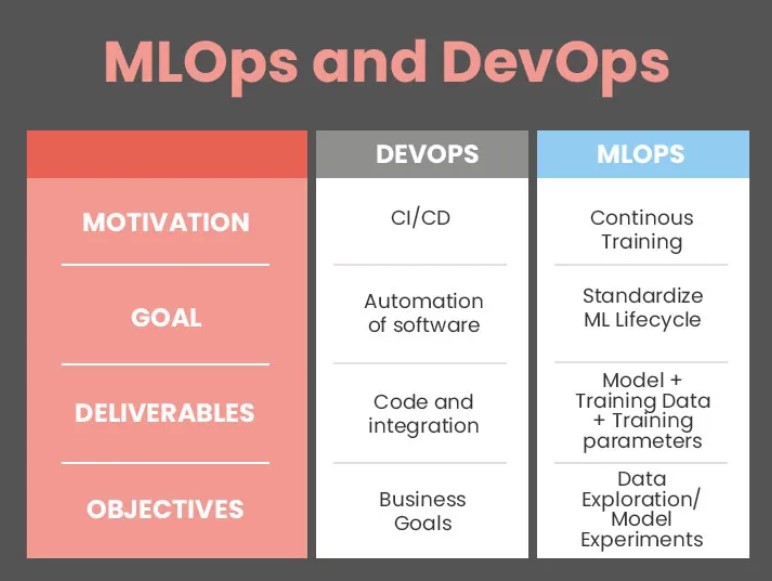
MLOps, short for Machine Learning Operations, is a set of practices and tools that combine machine learning (ML) and DevOps (development and operations). It aims to automate and streamline the entire machine learning lifecycle, from data collection and preprocessing to model training, deployment, monitoring, and maintenance.

In this article, we’ll show you how to set up the MLOps environment, including what MLOps is, why it’s important, and how to choose a cloud platform, set up data storage, and configure data processing. We’ll also cover the data pipeline for staff tracking, including data collection, preprocessing, storage, and visualisation.

Setting Up the MLOPs Environment

What is MLOps?

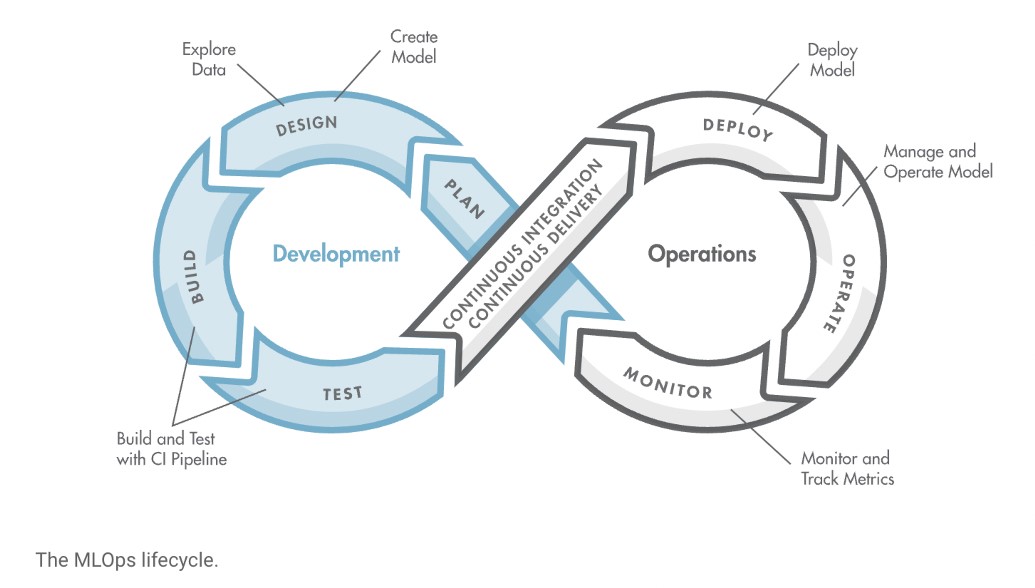
MLOps, short for Machine Learning Operations, is a set of practices that brings together machine learning (ML) and DevOps (development and operations). The goal of MLOps is to make the process of developing, deploying, and maintaining machine learning models as smooth and efficient as possible. Let’s break down how it works.

The MLOps Cycle. Source: Kate Dewhirst

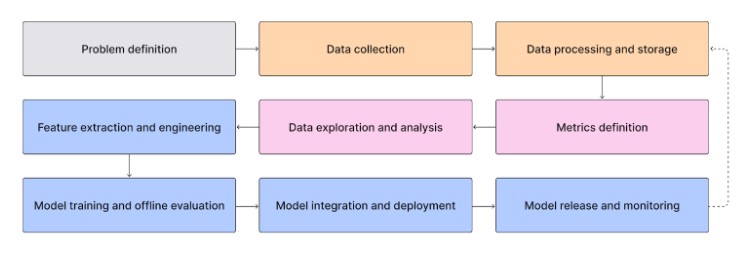
The first step in the MLOps process is data collection. MLOps helps gather data from various sources and makes sure that it is consistent and usable. Next, data preprocessing involves cleaning and preparing the data for analysis. MLOps automates tasks like removing errors, normalising data, and transforming it into a suitable format for training ML models.

Once the data is ready, the model training phase begins. Here, the preprocessed data is used to train machine learning models to make predictions or decisions. MLOps streamlines this process with tools and frameworks that make training faster and more reliable. After training, the models need to be deployed so they can start making predictions on new data. MLOps makes deployment easy and ensures seamless integration with existing systems.

Monitoring the model’s performance after deployment is key to be sure that it works as expected. MLOps provides tools to track performance and detect any issues early. Over time, models may need updates or retraining as new data becomes available. MLOps simplifies the process of updating models. By combining these practices, MLOps reduces the time and effort needed to keep machine learning models running smoothly, making the entire process more efficient and reliable.

Importance of a Strong MLOps Environment for a Staff Tracking System

A strong MLOps environment is vital for running a real-time computer vision-enabled hospital staff tracking system. The stronger the environment, the more data and users the system can handle as the hospital grows. MLOps helps with continuous integration and deployment, meaning updates and improvements can be made smoothly without interrupting hospital operations. A continuous feedback loop keeps the system performing well.

Advantages of MLOps. Source: NetApp

Monitoring and maintaining the system is easier with MLOps because it provides tools to check how well the models are working and catch problems early. It also promotes teamwork between data scientists, machine learning engineers, and IT staff. Teamwork, clear communication, and understanding help create models that fit well into hospital workflows. Lastly, MLOps makes sure all processes are clear and can be repeated. That is one of the most important elements because it keeps the system trustworthy.

Steps for Setting Up the MLOps Environment

With a solid understanding of why a robust MLOps environment is so valuable, let’s move on to the steps for setting it up effectively. We’ll cover choosing a cloud platform, setting up a data storage solution, and configuring a data processing framework.

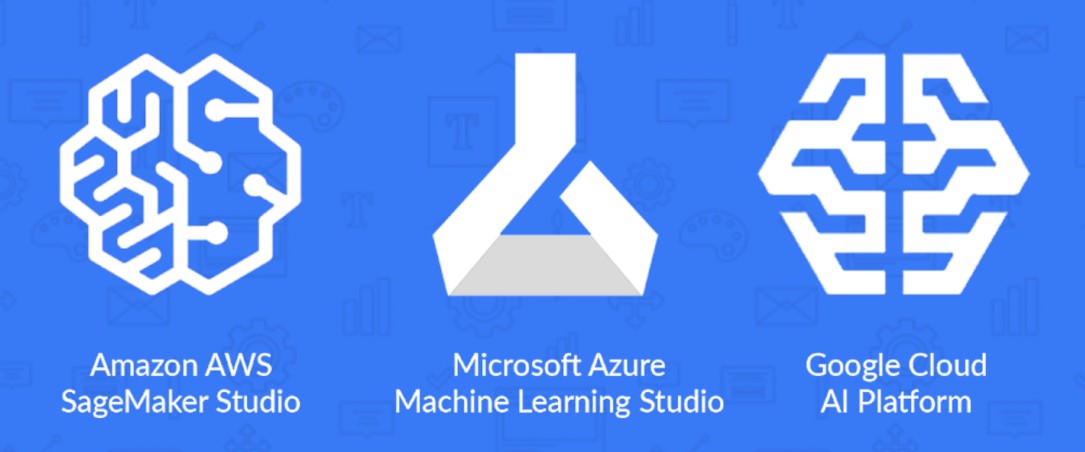
The first step is to choose the right cloud platform to host your machine learning models for the staff tracking system. Popular options include Amazon Web Services (AWS), Google Cloud Platform (GCP), and Microsoft Azure. These platforms offer tools to help you build, train, and deploy machine learning models.

For instance, AWS provides SageMaker. Amazon SageMaker can simplify the process of developing and deploying your staff tracking models. GCP offers an AI Platform that integrates well with other Google services. It is a good choice if you already use Google’s suite of tools. Microsoft Azure’s Machine Learning service provides robust end-to-end workflows to manage your staff tracking models. When making your choice, consider factors like cost, available services, ease of use, and how well they fit with your hospital’s existing systems.

Cloud Machine Learning Platforms. Source: Datagrom

Next, set up a reliable and scalable data storage solution to handle the large amounts of data your staff tracking system will generate. Cloud storage services such as Amazon S3, Google Cloud Storage, and Azure Blob Storage are excellent for securely storing both raw video footage from cameras and processed data. These services offer durability and scalability so that your data storage can scale up as your hospital operations grow. For structured data, such as logs and analytics, use managed databases like Amazon RDS, Google Cloud SQL, or Azure SQL Database. These databases handle maintenance tasks for you, making focusing on your core operations easier. If your hospital deals with a lot of unstructured data, setting up a data lake allows you to store this data in its raw form, providing flexibility for later analysis.

Finally, you can configure a data processing framework to manage and analyse the collected data from the staff tracking system. Start by setting up ways to collect data from cameras installed around the hospital. Gathering data in a consistent format simplifies processing and analysis.

Data preprocessing involves cleaning and preparing the data. This could involve removing blurry images, normalising values, and converting them into a format suitable for machine learning models. Automated tools and scripts can streamline extracting frames and relevant features for the staff tracking algorithm from video footage.

Using a mix of cloud storage services and databases helps manage different types of data. Then, you can use visualisation tools like Tableau, Power BI, or custom dashboards to display the data. Visualisation helps hospital administrators and staff gain insights into staff movements and availability. By understanding staff movements, the hospital can better make decisions and allocate resources. By following these steps, you can set up a strong MLOps environment customised to the needs of a real-time hospital staff tracking system.

Example Code for Data Collection and Preprocessing

Before discussing the data pipeline in detail, let’s walk through an example of a simple Python script using OpenCV for data collection and preprocessing. It’ll help us visualise one of the processes involved in building a data pipeline.

This script captures video frames, preprocesses them by resizing and converting them to grayscale, and then saves the processed frames to a specified directory. It begins by importing the necessary libraries. It then defines a directory named ‘processed_frames’ to save the processed frames and creates it if it doesn’t already exist.

The script initialises a video capture object to read from a video file. A loop runs while the video capture object is open, reading each frame of the video. Each frame is resized to 640x480 pixels to standardise the size and converted to grayscale to reduce the complexity of the data.

The processed frame is then saved in the ‘processed_frames’ directory with a sequential filename format (e.g., ‘frame_0001.jpg’). After processing all frames, the video capture is released, and all OpenCV windows are closed.


import cv2
import os

# Define the directory to save frames
output_dir = 'processed_frames'
os.makedirs(output_dir, exist_ok=True)

# Initialise the video capture object
cap = cv2.VideoCapture('path/to/video/file.mp4')

frame_count = 0
while cap.isOpened():
    ret, frame = cap.read()
    if not ret:
        break
    
    # Preprocess the frame (e.g., resize, normalise)
    processed_frame = cv2.resize(frame, (640, 480))
    processed_frame = cv2.cvtColor(processed_frame, cv2.COLOR_BGR2GRAY)
    
    # Save the processed frame
    frame_filename = os.path.join(output_dir, f'frame_{frame_count:04d}.jpg')
    cv2.imwrite(frame_filename, processed_frame)
    
    frame_count += 1

cap.release()
cv2.destroyAllWindows()


Data Pipeline for Staff Tracking

Now that we’ve seen a code perspective of how visual data can be gathered, we need to explore how to set up a data pipeline for the real-time computer vision-enabled staff tracking system in hospitals. It’s important to understand and define the data requirements and build a strong data pipeline.

Data Requirements for the Use Case

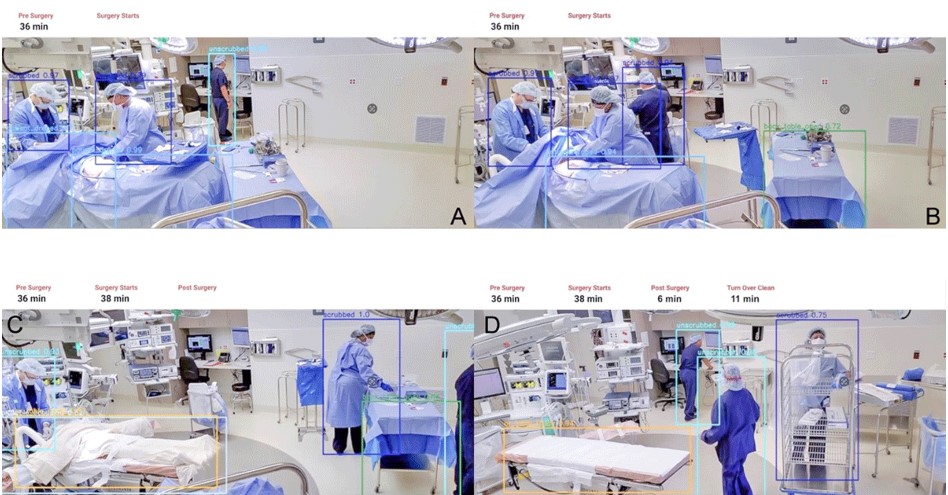
For the staff tracking system, you’ll need different types of data. The main requirement is continuous video footage from high-quality cameras placed around the hospital. Video data needs to be paired with information like camera locations, timestamps, and details about different hospital areas. You will also need information about the hospital staff, such as their roles, departments, and schedules, to help accurately identify and track their movements.

Staff Being Tracked in a Hospital. Source: Houston Methodist

Data Pipeline Architecture

These are the key steps in the data pipeline for staff tracking:

  • Data Collection: Cameras and sensors placed around the hospital capture high-quality video footage. Additional information like timestamps and camera locations is also gathered.

  • Data Preprocessing: Extract frames from the video footage for analysis. Clean the data by removing any bad frames. Normalise the data to keep the brightness and contrast consistent. Identify and extract important features, such as staff uniforms or ID badges, to help with tracking.

  • Data Storage: Store the raw video footage and processed frames in cloud storage services like Amazon S3, Google Cloud Storage, or Azure Blob Storage. Store additional information, like staff schedules, in databases such as Amazon RDS, Google Cloud SQL, or Azure SQL Database.

  • Data Visualisation: Use tools like Tableau, Power BI, or custom dashboards to display real-time staff locations, movement patterns, and staff availability. It helps hospital administrators make better decisions and manage resources efficiently.

What We Can Offer as TechnoLynx?

At TechnoLynx, we pride ourselves on custom software development that meets the specific demands of incorporating MLOps into various sectors. Our team’s expertise can help your operations run smoothly and make sure that large data sets are managed efficiently throughout the machine learning lifecycle.

With our skills in MLOps, IoT, computer vision, generative AI, GPU acceleration, natural language processing, and AR/VR/MR/XR, we can help you explore new possibilities for your business. We are dedicated to advancing innovation while maintaining strict safety and ethical protocols. If you are looking to transform your business with innovative MLOps solutions and need an AI consultant, contact us today, and let’s explore the future together!

Conclusion

Setting up MLOps and strong data pipelines allows you to establish an effective hospital staff tracking system. MLOps ensures smooth automation, collaboration, and continuous improvement. Efficient data pipelines help in accurate data collection, preprocessing, storage, and visualisation. Together, they create a scalable and reliable real-time tracking and analysis system.

Good data management leads to better patient care by making sure staff are allocated optimally and can respond quickly in emergencies. It also improves staff satisfaction by preventing overwork and streamlining workflows, leading to better hospital operations through data-driven decisions.

With this solid foundation, the next article will focus on building and integrating machine learning models. These models will give deeper insights, like predicting staff demand and spotting operational bottlenecks, further boosting the hospital’s efficiency and capabilities.

Continue reading: MLOps for Hospitals - Model Training, Deployment, and Monitoring for Staff Tracking (Part 2)

Sources for the images:

  • Dedmari, M. A. (2021) ‘Demystifying MLOps: part 1’, NetApp, 17 June.

  • Dewhirst, K. (2017) ‘Professional Staff Leaves of Absence – is your hospital prepared?’, Kate Dewhirst Health Law, 2 October.

  • Freepik (n.d.) ‘Rendering of anime doctors at work’ AI-generated

  • MathWorks (n.d.) ‘What Is MLOps?’, MathWorks.

  • McCalley, E. (2020) ‘Released in 2020: Meet AWS SageMaker Studio, Azure Machine Learning Studio, & GCP AI Platform’, Datagrom - AI & Data Science Consulting, 12 October.

  • Osztrogonacz, P., Chinnadurai, P. and Lumsden, A.B. (2023) ‘Emerging applications for computer vision and Artificial Intelligence in management of the cardiovascular patient’, Methodist DeBakey Cardiovascular Journal, 19(4), pp. 17–23. doi:10.14797/mdcvj.1263.

References:

  • Nayak, Y. (2021) ‘A Gentle Introduction to MLOps’, Towards Data Science.

  • Pragma Market Research. (2024) ‘Global Computer Vision in Healthcare Market Size, Share, Growth Drivers, Recent Trends, Opportunities, Competitive Analysis and Forecast to 2030’, PMR Research.

  • Smith, A. (2020) ‘End-to-end Machine Learning Platforms Compared’, Towards Data Science, 13 July

Cost, Efficiency, and Value Are Not the Same Metric

Cost, Efficiency, and Value Are Not the Same Metric

17/04/2026

Performance per dollar. Tokens per watt. Cost per request. These sound like the same thing said differently, but they measure genuinely different dimensions of AI infrastructure economics. Conflating them leads to infrastructure decisions that optimize for the wrong objective.

Precision Is an Economic Lever in Inference Systems

Precision Is an Economic Lever in Inference Systems

17/04/2026

Precision isn't just a numerical setting — it's an economic one. Choosing FP8 over BF16, or INT8 over FP16, changes throughput, latency, memory footprint, and power draw simultaneously. For inference at scale, these changes compound into significant cost differences.

Precision Choices Are Constrained by Hardware Architecture

Precision Choices Are Constrained by Hardware Architecture

17/04/2026

You can't run FP8 inference on hardware that doesn't have FP8 tensor cores. Precision format decisions are conditional on the accelerator's architecture — its tensor core generation, native format support, and the efficiency penalties for unsupported formats.

Steady-State Performance, Cost, and Capacity Planning

Steady-State Performance, Cost, and Capacity Planning

17/04/2026

Capacity planning built on peak performance numbers over-provisions or under-delivers. Real infrastructure sizing requires steady-state throughput — the predictable, sustained output the system actually delivers over hours and days, not the number it hit in the first five minutes.

How Benchmark Context Gets Lost in Procurement

How Benchmark Context Gets Lost in Procurement

16/04/2026

A benchmark result starts with full context — workload, software stack, measurement conditions. By the time it reaches a procurement deck, all that context is gone. The failure mode is not wrong benchmarks but context loss during propagation.

Building an Audit Trail: Benchmarks as Evidence for Governance and Risk

Building an Audit Trail: Benchmarks as Evidence for Governance and Risk

16/04/2026

High-value AI hardware decisions need traceable evidence, not slide-deck bullet points. When benchmarks are documented with methodology, assumptions, and limitations, they become auditable institutional evidence — defensible under scrutiny and revisitable when conditions change.

The Comparability Protocol: Why Benchmark Methodology Defines What You Can Compare

The Comparability Protocol: Why Benchmark Methodology Defines What You Can Compare

16/04/2026

Two benchmark scores can only be compared if they share a declared methodology — the same workload, precision, measurement protocol, and reporting conditions. Without that contract, the comparison is arithmetic on numbers of unknown provenance.

A Decision Framework for Choosing AI Hardware

A Decision Framework for Choosing AI Hardware

16/04/2026

Hardware selection is a multivariate decision under uncertainty — not a score comparison. This framework walks through the steps: defining the decision, matching evaluation to deployment, measuring what predicts production, preserving tradeoffs, and building a repeatable process.

How Benchmarks Shape Organizations Before Anyone Reads the Score

How Benchmarks Shape Organizations Before Anyone Reads the Score

16/04/2026

Before a benchmark score informs a purchase, it has already shaped what gets optimized, what gets reported, and what the organization considers important. Benchmarks function as decision infrastructure — and that influence deserves more scrutiny than the number itself.

Accuracy Loss from Lower Precision Is Task‑Dependent

Accuracy Loss from Lower Precision Is Task‑Dependent

16/04/2026

Reduced precision does not produce a uniform accuracy penalty. Sensitivity depends on the task, the metric, and the evaluation setup — and accuracy impact cannot be assumed without measurement.

Precision Is a Design Parameter, Not a Quality Compromise

Precision Is a Design Parameter, Not a Quality Compromise

16/04/2026

Numerical precision is an explicit design parameter in AI systems, not a moral downgrade in quality. This article reframes precision as a representation choice with intentional trade-offs, not a concession made reluctantly.

Mixed Precision Works by Exploiting Numerical Tolerance

Mixed Precision Works by Exploiting Numerical Tolerance

16/04/2026

Not every multiplication deserves 32 bits. Mixed precision works because neural network computations have uneven numerical sensitivity — some operations tolerate aggressive precision reduction, others don't — and the performance gains come from telling them apart.

Throughput vs Latency: Choosing the Wrong Optimization Target

16/04/2026

Throughput and latency are different objectives that often compete for the same resources. This article explains the trade-off, why batch size reshapes behavior, and why percentiles matter more than averages in latency-sensitive systems.

Quantization Is Controlled Approximation, Not Model Damage

16/04/2026

When someone says 'quantize the model,' the instinct is to hear 'degrade the model.' That framing is wrong. Quantization is controlled numerical approximation — a deliberate engineering trade-off with bounded, measurable error characteristics — not an act of destruction.

GPU Utilization Is Not Performance

15/04/2026

The utilization percentage in nvidia-smi reports kernel scheduling activity, not efficiency or throughput. This article explains the metric's exact definition, why it routinely misleads in both directions, and what to pair it with for accurate performance reads.

FP8, FP16, and BF16 Represent Different Operating Regimes

15/04/2026

FP8 is not just 'half of FP16.' Each numerical format encodes a different set of assumptions about range, precision, and risk tolerance. Choosing between them means choosing operating regimes — different trade-offs between throughput, numerical stability, and what the hardware can actually accelerate.

Peak Performance vs Steady‑State Performance in AI

15/04/2026

AI systems rarely operate at peak. This article defines the peak vs. steady-state distinction, explains when each regime applies, and shows why evaluations that capture only peak conditions mischaracterize real-world throughput.

The Software Stack Is a First‑Class Performance Component

15/04/2026

Drivers, runtimes, frameworks, and libraries define the execution path that determines GPU throughput. This article traces how each software layer introduces real performance ceilings and why version-level detail must be explicit in any credible comparison.

The Mythology of 100% GPU Utilization

15/04/2026

Is 100% GPU utilization bad? Will it damage the hardware? Should you be worried? For datacenter AI workloads, sustained high utilization is normal — and the anxiety around it usually reflects gaming-era intuitions that don't apply.

Why Benchmarks Fail to Match Real AI Workloads

15/04/2026

The word 'realistic' gets attached to benchmarks freely, but real AI workloads have properties that synthetic benchmarks structurally omit: variable request patterns, queuing dynamics, mixed operations, and workload shapes that change the hardware's operating regime.

Why Identical GPUs Often Perform Differently

15/04/2026

'Same GPU' does not imply the same performance. This article explains why system configuration, software versions, and execution context routinely outweigh nominal hardware identity.

Training and Inference Are Fundamentally Different Workloads

15/04/2026

A GPU that excels at training may disappoint at inference, and vice versa. Training and inference stress different system components, follow different scaling rules, and demand different optimization strategies. Treating them as interchangeable is a design error.

Performance Ownership Spans Hardware and Software Teams

15/04/2026

When an AI workload underperforms, attribution is the first casualty. Hardware blames software. Software blames hardware. The actual problem lives in the gap between them — and no single team owns that gap.

Performance Emerges from the Hardware × Software Stack

15/04/2026

AI performance is an emergent property of hardware, software, and workload operating together. This article explains why outcomes cannot be attributed to hardware alone and why the stack is the true unit of performance.

Power, Thermals, and the Hidden Governors of Performance

14/04/2026

Every GPU has a physical ceiling that sits below its theoretical peak. Power limits, thermal throttling, and transient boost clocks mean that the performance you read on the spec sheet is not the performance the hardware sustains. The physics always wins.

Why AI Performance Changes Over Time

14/04/2026

That impressive throughput number from the first five minutes of a training run? It probably won't hold. AI workload performance shifts over time due to warmup effects, thermal dynamics, scheduling changes, and memory pressure. Understanding why is the first step toward trustworthy measurement.

CUDA, Frameworks, and Ecosystem Lock-In

14/04/2026

Why is it so hard to switch away from CUDA? Because the lock-in isn't in the API — it's in the ecosystem. Libraries, tooling, community knowledge, and years of optimization create switching costs that no hardware swap alone can overcome.

GPUs Are Part of a Larger System

14/04/2026

CPU overhead, memory bandwidth, PCIe topology, and host-side scheduling routinely limit what a GPU can deliver — even when the accelerator itself has headroom. This article maps the non-GPU bottlenecks that determine real AI throughput.

Why AI Performance Must Be Measured Under Representative Workloads

14/04/2026

Spec sheets, leaderboards, and vendor numbers cannot substitute for empirical measurement under your own workload and stack. Defensible performance conclusions require representative execution — not estimates, not extrapolations.

Low GPU Utilization: Where the Real Bottlenecks Hide

14/04/2026

When GPU utilization drops below expectations, the cause usually isn't the GPU itself. This article traces common bottleneck patterns — host-side stalls, memory-bandwidth limits, pipeline bubbles — that create the illusion of idle hardware.

Why GPU Performance Is Not a Single Number

14/04/2026

AI GPU performance is multi-dimensional and workload-dependent. This article explains why scalar rankings collapse incompatible objectives and why 'best GPU' questions are structurally underspecified.

What a GPU Benchmark Actually Measures

14/04/2026

A benchmark result is not a hardware measurement — it is an execution measurement. The GPU, the software stack, and the workload all contribute to the number. Reading it correctly requires knowing which parts of the system shaped the outcome.

Why Spec‑Sheet Benchmarking Fails for AI

14/04/2026

GPU spec sheets describe theoretical limits. This article explains why real AI performance is an execution property shaped by workload, software, and sustained system behavior.

TPU vs GPU: Practical Pros and Cons Explained

24/02/2026

A TPU and GPU comparison for machine learning, real time graphics, and large scale deployment, with simple guidance on cost, fit, and risk.

Cracking the Mystery of AI’s Black Box

4/02/2026

A guide to the AI black box problem, why it matters, how it affects real-world systems, and what organisations can do to manage it.

Inside Augmented Reality: A 2026 Guide

3/02/2026

A 2026 guide explaining how augmented reality works, how AR systems blend digital elements with the real world, and how users interact with digital content through modern AR technology.

Smarter Checks for AI Detection Accuracy

2/02/2026

A clear guide to AI detectors, why they matter, how they relate to generative AI and modern writing, and how TechnoLynx supports responsible and high‑quality content practices.

Machine Learning on the Edge: Fast Decisions, Less Delay

30/01/2026

Learn how edge learning reduces delay, limits data transfer, and supports safer services by analysing data close to where it is created.

Choosing Vulkan, OpenCL, SYCL or CUDA for GPU Compute

28/01/2026

A practical comparison of Vulkan, OpenCL, SYCL and CUDA, covering portability, performance, tooling, and how to pick the right path for GPU compute across different hardware vendors.

Deep Learning Models for Accurate Object Size Classification

27/01/2026

A clear and practical guide to deep learning models for object size classification, covering feature extraction, model architectures, detection pipelines, and real‑world considerations.

TPU vs GPU: Which Is Better for Deep Learning?

26/01/2026

A practical comparison of TPUs and GPUs for deep learning workloads, covering performance, architecture, cost, scalability, and real‑world training and inference considerations.

GPU‑Powered Machine Learning with NVIDIA cuML

21/01/2026

Understand how GPU‑powered machine learning with NVIDIA cuML helps teams train models faster, work with larger data sets, and build stronger solutions without heavy infrastructure demands.

CUDA vs ROCm: Choosing for Modern AI

20/01/2026

A practical comparison of CUDA vs ROCm for GPU compute in modern AI, covering performance, developer experience, software stack maturity, cost savings, and data‑centre deployment.

Best Practices for Training Deep Learning Models

19/01/2026

A clear and practical guide to the best practices for training deep learning models, covering data preparation, architecture choices, optimisation, and strategies to prevent overfitting.

Measuring GPU Benchmarks for AI

15/01/2026

A practical guide to GPU benchmarks for AI; what to measure, how to run fair tests, and how to turn results into decisions for real‑world projects.

GPU‑Accelerated Computing for Modern Data Science

14/01/2026

Learn how GPU‑accelerated computing boosts data science workflows, improves training speed, and supports real‑time AI applications with high‑performance parallel processing.

CUDA vs OpenCL: Picking the Right GPU Path

13/01/2026

A clear, practical guide to cuda vs opencl for GPU programming, covering portability, performance, tooling, ecosystem fit, and how to choose for your team and workload.

Performance Engineering for Scalable Deep Learning Systems

12/01/2026

Learn how performance engineering optimises deep learning frameworks for large-scale distributed AI workloads using advanced compute architectures and state-of-the-art techniques.

Back See Blogs
arrow icon