Introduction
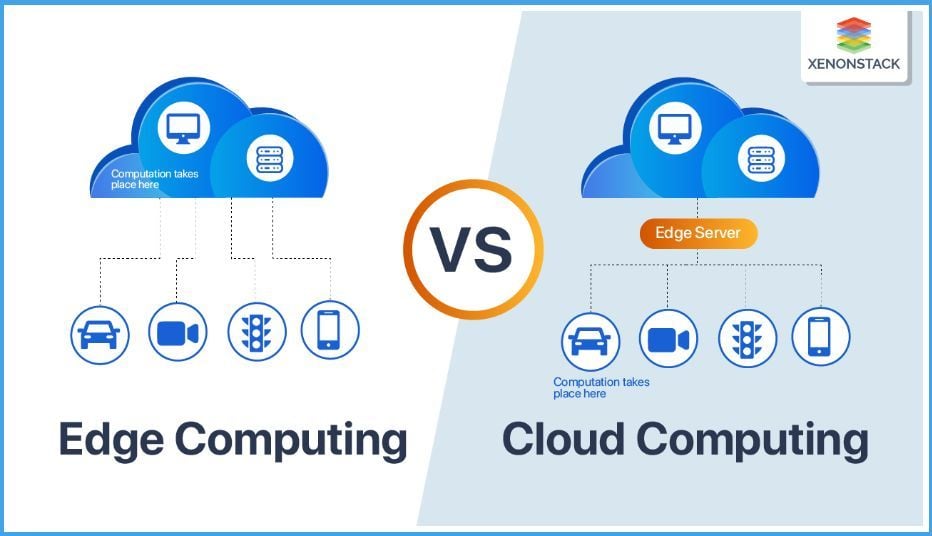
Production computer-vision deployments fall into three architectural buckets: cloud-only inference for high-accuracy, latency-tolerant workloads; cloud-fallback designs that tolerate graceful degradation under network stress; and edge-only systems where connectivity is absent, latency budgets are tight, or privacy constraints forbid upstream transmission. The trade-offs that govern where each workload should run are well characterised in 2026 — latency budget, accuracy target, hardware constraints, cost-per-inference, network and privacy — and the architecture choice should follow the trade-off analysis rather than the technology preference. This article walks the trade-off space, the production edge hardware (Jetson, Intel NCS, Coral, others), the cost comparison, model sizing, and the hybrid patterns that survive real-world deployment (see the computer vision landing for the broader programme).
What this means in practice
- Edge vs cloud is a trade-off analysis, not a binary preference.
- Per-camera per-workload analysis beats global architecture choice.
- Hybrid patterns dominate mature deployments.
- Model sizing is the most controllable trade-off lever.
How do I deploy computer vision models on edge devices reliably?
The reliability requirements:
Latency stability. Inference latency stays within budget across all conditions (cold start, sustained load, thermal throttling, concurrent workload).
Accuracy stability. Model accuracy doesn’t degrade under deployment conditions (low light, occlusion, novel scene content).
Power stability. Power consumption stays within budget across all conditions; battery-powered devices have hard constraints.
Availability. Device runs reliably without supervision; fault recovery automated; failure modes well-characterised.
Update-ability. Model updates deploy reliably; rollback mechanism exists; deployment doesn’t disrupt operation.
Observability. Performance metrics, errors, anomalies visible to operators; not blind operation.
The deployment pattern:
Stage 1: model selection and sizing. Model architecture and size chosen for target hardware; quantisation, pruning, knowledge distillation as needed.
Stage 2: hardware selection. Edge device chosen for compute, memory, power, I/O, environmental constraints, vendor ecosystem.
Stage 3: inference framework. Hardware-appropriate inference framework (TensorRT for Jetson, OpenVINO for Intel, Coral Edge TPU runtime, ONNX Runtime, etc.).
Stage 4: integration. Camera, preprocessing, postprocessing, downstream system integration; tested as a whole system.
Stage 5: characterisation. Performance characterisation under realistic conditions (sustained load, varying scene content, varying environmental conditions, concurrent workload).
Stage 6: pilot deployment. Single-site or small-fleet pilot; observability captures performance; issues identified before broad deployment.
Stage 7: production deployment. Fleet deployment; ongoing monitoring; periodic refresh.
The reliability anti-patterns:
Lab-only characterisation. Performance characterised in lab conditions only; production exposes performance gaps.
Hardware mismatch. Model designed for general-purpose GPU deployed to constrained edge; performance drops below useable.
No fallback. Single point of failure; no degraded-operation mode; no cloud fallback option.
No observability. Production blind operation; problems discovered through downstream impact.
No update mechanism. Model updates require manual intervention; updates rarely happen; performance drifts.
What is the latency / accuracy / power trade-off for edge CV, and how do I navigate it?
The trade-off envelope:
Latency. The time from input to output; bounded by hardware compute, memory bandwidth, model complexity.
Accuracy. Model performance on the task; bounded by model capacity, training data, deployment conditions.
Power. Energy consumed per inference; bounded by hardware design, model complexity, workload duty cycle.
The trade-offs (typical):
Higher accuracy → larger model → higher latency, higher power.
Lower latency → smaller model OR more powerful hardware (which costs more, uses more power).
Lower power → smaller model OR less powerful hardware (which lowers performance).
The trade-off levers:
Model architecture. Different architectures (efficient transformers vs CNNs vs hybrid) trade differently along axes.
Model size. Pruning, quantisation, knowledge distillation reduce model size; lower accuracy somewhat, lower latency and power significantly.
Quantisation. INT8 quantisation typically halves memory, halves latency, modestly reduces accuracy on appropriate models.
Hardware selection. Different hardware targets different points on the trade-off envelope.
Workload duty cycle. Continuous inference vs event-triggered inference changes effective power consumption.
Multi-stage pipelines. Fast first-pass detection followed by slow refined inference on candidates; reduces average latency and power without reducing accuracy significantly.
The navigation methodology:
Step 1: Define constraints. Maximum acceptable latency, minimum acceptable accuracy, maximum acceptable power.
Step 2: Characterise candidate models on candidate hardware. Performance per model-hardware combination measured.
Step 3: Identify Pareto frontier. Combinations that are not dominated by other combinations on all three axes.
Step 4: Select operating point. Within Pareto frontier, choose based on application-specific priorities.
Step 5: Tune. Within selected operating point, tune model and pipeline for specific deployment conditions.
Step 6: Validate. Validate operating point performance under realistic deployment conditions.
The trade-off characterisation tools. NVIDIA Nsight, Intel VTune, vendor-specific profilers; performance counters; energy measurement (where available).
Jetson Nano vs Intel Neural Compute Stick vs Coral — which edge target fits my constraints?
The hardware comparison (2026, indicative):
NVIDIA Jetson family. Jetson Orin Nano, Orin NX, AGX Orin offer 20-275 TOPS at 7-60W; CUDA-compatible; large software ecosystem; mid-to-high cost; works for general-purpose inference and full computer-vision pipelines including video processing.
Intel Neural Compute Stick 2 / OpenVINO targets. NCS2 offers ~4 TOPS at 1W via USB; OpenVINO supports broader Intel hardware (CPU, GPU, VPU, FPGA); good for adding inference to existing x86 systems; lower performance than Jetson; mature for CV workloads.
Google Coral. Coral USB Accelerator and Coral Dev Board offer 4 TOPS at 2W via the Edge TPU; TensorFlow Lite ecosystem; low cost; works for INT8-quantised models; constrained to compatible operations.
Hailo. Hailo-8 and successors offer 26+ TOPS at 2.5W; strong perf-per-watt; software ecosystem maturing; lower cost than Jetson at similar throughput.
AMD ROCm targets. ROCm-compatible AMD hardware; CUDA-like programming; growing software ecosystem; appropriate for some workloads.
Qualcomm AI Engine. Snapdragon-based systems (mobile, embedded); strong perf-per-watt; constrained to compatible models; appropriate for mobile and embedded.
Apple Neural Engine. M-series and A-series; not generally an embedded option but relevant for iOS/macOS deployments.
The selection criteria:
Compute requirement (TOPS). Set by model size, frame rate, frame size.
Power budget. Set by deployment context (mains-powered vs battery vs solar).
Software ecosystem. Familiarity, framework support, debugging tools.
Form factor. Module vs board vs SOM vs custom integration.
Cost. Unit cost, development cost, support cost.
Lifecycle. Vendor commitment, software-support lifetime, replacement options.
Compliance. Industrial-grade vs commercial; environmental certifications; security features.
The pattern in 2026:
Mid-to-heavy CV workloads → Jetson family.
Light CV workloads at low power → Coral, Hailo, NCS2.
Adding inference to existing x86 → OpenVINO targets.
Custom embedded → Hailo, Qualcomm, custom ASIC.
Cost-sensitive at scale → Coral, Hailo.
The vendor consideration. Software ecosystem and vendor support frequently matter more than raw TOPS. A well-supported lower-TOPS platform may deliver better production outcomes than a higher-TOPS platform with weak software.
What does edge inference cost compared to cloud inference for a video-analytics workload?
The cost models:
Cloud inference cost. Per-inference cost (GPU rental, managed-inference service like AWS SageMaker, Google Vertex AI, Azure ML); plus data transfer cost; plus orchestration overhead.
Edge inference cost. Capital cost of edge hardware; operational cost (power, maintenance, replacement); per-inference cost approaches zero.
The break-even analysis:
For high-volume continuous inference (typical video analytics), edge inference is cheaper than cloud at modest volumes; the break-even is typically reached in months for camera-attached deployments.
For low-volume episodic inference, cloud may be cheaper; the per-inference cost is low and there’s no capital outlay.
The total-cost-of-ownership factors:
Edge hardware refresh. Edge hardware has lifecycle (3-5 years typically); refresh cost amortised.
Edge maintenance. Field maintenance, replacement on failure, software updates.
Cloud egress cost. Video data transferred to cloud is expensive; per-GB egress charges accumulate.
Cloud compute scaling. Cloud compute scales with demand; spikes can be expensive.
Network requirements. Edge reduces bandwidth; cloud demands high-bandwidth network.
Latency cost. Cloud round-trip latency may be unacceptable for the application; cost of unacceptable latency is project failure.
Privacy cost. Sending video data to cloud raises privacy concerns; remediation cost (encryption, anonymisation, regional processing) is real.
Resilience. Edge continues to operate when network is unavailable; cloud requires network.
The 2026 deployment patterns:
Pure cloud. Low-volume, latency-tolerant, accuracy-critical inference.
Pure edge. Latency-critical, network-disconnected, privacy-driven.
Hybrid. Edge for first-pass detection, cloud for refined analysis; the dominant pattern for many video-analytics applications.
Cloud-fallback. Edge primary, cloud fallback on edge failure or for edge-confused cases.
The cost-analysis methodology:
Step 1: Inference volume. Frames per second × cameras × hours = inference volume.
Step 2: Cloud cost. Inference volume × per-inference cloud cost + data transfer cost + orchestration overhead.
Step 3: Edge cost. Hardware cost / amortisation period + power cost + maintenance cost + operational overhead.
Step 4: Total-cost comparison over 3-5 year deployment lifetime.
The result for typical video analytics (60+ fps, multi-camera, sustained operation) is that edge wins on cost; for low-volume, episodic, or accuracy-critical workloads, cloud or hybrid wins.
How do I size models so they hit latency targets on the chosen edge hardware?
The sizing methodology:
Step 1: Baseline model. Start with the model that achieves required accuracy on training data.
Step 2: Hardware characterisation. Measure baseline-model latency on target hardware; characterise per-layer compute, memory bandwidth, memory footprint.
Step 3: Identify bottleneck. Compute-bound, memory-bandwidth-bound, or memory-footprint-bound?
Step 4: Apply size-reduction techniques.
Quantisation. INT8 typically; reduces memory bandwidth and footprint; often improves compute throughput on quantisation-aware hardware; modest accuracy impact for many models.
Pruning. Structured pruning (channel-level) more effective on most hardware than unstructured; reduces compute and memory.
Knowledge distillation. Train smaller student model from larger teacher; preserves accuracy at smaller size.
Architecture choice. Efficient architectures (MobileNet, EfficientNet, MobileViT, ConvNeXt-tiny) outperform pruning of large architectures for size-constrained deployments.
Input resolution reduction. Reduce input resolution if task tolerates; reduces compute proportionally.
Layer reduction. Remove redundant or low-impact layers.
Step 5: Re-characterise. Measure modified-model latency on target hardware.
Step 6: Iterate. Continue until latency target met or accuracy floor reached.
The hardware-specific tuning:
Jetson. TensorRT optimisation (layer fusion, kernel auto-tuning, INT8 calibration); custom plugins for unsupported operations.
Coral. TensorFlow Lite Edge TPU compilation; INT8 quantisation; supported operations only.
OpenVINO. Model Optimizer for hardware-specific optimisation; INT8 quantisation; multi-device deployment.
The sizing anti-patterns:
Quantise first, validate later. Aggressive quantisation without validation; accuracy drop discovered in production.
Prune without re-train. Pruning without subsequent retraining; accuracy drop excessive.
Architecture inertia. Sticking with original architecture when efficient architecture would solve the problem better.
Ignore preprocessing. Preprocessing on CPU bottlenecks pipeline; full pipeline must be characterised, not just inference.
The 2026 tools. Vendor profilers (Nsight, OpenVINO Workbench, Edge TPU Compiler), NAS (neural architecture search) tools, AutoML platforms with edge-deployment optimisation.
Which architectural patterns (on-device-only, hybrid, cloud-fallback) survive real-world deployment?
The surviving patterns:
On-device-only. All inference on edge; no network dependency; appropriate for network-disconnected deployments (remote sites, mobile, industrial isolation) and privacy-driven deployments. Survives when network is unreliable or unavailable, when privacy is paramount, when latency is critical.
Hybrid edge-cloud. First-pass detection on edge; refined analysis on cloud for candidate events. The dominant pattern for many video-analytics applications. Survives because it balances latency, accuracy, cost, and bandwidth.
Cloud-fallback. Edge primary, cloud fallback when edge fails or is uncertain. Survives when reliability matters and network is available.
Cloud-primary, edge-cache. Cloud inference primary; edge caches recent results or runs lightweight pre-filter. Less common; survives when cloud accuracy and capability matter more than latency.
Federated edge. Multiple edge devices coordinate; one device may run heavier inference and share results. Survives in some industrial settings.
The patterns that don’t survive:
Pure cloud for latency-critical video. Cloud round-trip latency is incompatible with real-time video analytics; appears in failed deployments.
Pure edge without observability. Edge devices in production without performance monitoring; problems discovered through downstream impact only; reliability degrades over time.
Edge with no update path. Edge devices that can’t receive model updates remotely; deployment becomes stale; the system has finite useful life.
Edge with no fallback for catastrophic failure. Edge devices that fail without alerting; the system reports nothing rather than wrong things; failure mode undesirable for many applications.
The 2026 design principles:
Per-camera per-workload architecture. The right architecture varies; one-size-fits-all rarely survives.
Observability throughout. Edge, cloud, network, downstream all observable.
Update path always. Model updates, software updates, configuration updates remote.
Fallback for catastrophic failure. Even if degraded, the system signals presence and basic information.
Cost-aware. Total cost over deployment lifetime considered, not just initial cost.
Privacy and regulatory aware. Data handling considered; cross-border data transfer; sector-specific regulation (HIPAA for health, GDPR for EU, sector-specific for finance).
The vendor consideration. Mature CV platforms (NVIDIA Metropolis, Intel OpenVINO, edge-orchestration platforms like AWS Panorama, Azure Stack Edge) provide framework for these architectures; rolling-your-own is high effort and the maintained-platform approach often wins on lifecycle cost.
Bandwidth cost dominates compute cost at fifteen cameras
Compare the cost of a local Jetson running YOLO against the bandwidth charges and round-trip delay of cloud inference—if either metric violates your control-loop requirements, edge deployment pays for itself. We focus on per-workload architecture analysis rather than vendor preferences. If your team is scoping a production CV deployment, contact us.
Image credits: Freepik