If you want to build a chess game that runs in the browser and has its own AI opponent, the work splits cleanly into three pieces: a board you can render and click on, a rules engine that knows what a legal move is, and an inference path that takes the current position and returns the engine’s next move. None of these are exotic on their own. The interesting part is how they connect — and why the choices you make on representation, move validation, and where inference runs determine whether the project ships or stalls.
This walkthrough follows our QueensGambit repository. The intent is not to ship a competitive engine. It is to show, end-to-end, how a small CNN trained in Python ends up making moves inside a static webpage.
A short history of chess machines, and why it matters
For decades, chess has served as the benchmark problem in artificial intelligence research. The first famous “chess machine,” Wolfgang von Kempelen’s Mechanical Turk from 1770, was a hoax — a chess master hidden inside a cabinet, moving the arms by hand. The debunking of the Turk became its own cautionary tale: a system that looks intelligent from the outside can be doing something much simpler underneath.
Alan Turing was among the first to take the problem seriously. Around 1948, Turing and David Champernowne wrote Turochamp, the first computer chess program. It assigned each piece a value — pawn 1, knight 3, bishop 3.5, rook 5, queen 10, king 1000 — looked two moves ahead, and chose the most rewarding line. Because no computer of the era could run it, Turing executed the algorithm on paper, roughly 30 minutes per move. He lost the test match to his friend Alick Glennie. The algorithm survived.
That lineage matters for the project at hand. The Turochamp pattern — explicit board representation, a generator of legal moves, and a scoring function that selects one — is the same skeleton we are about to build. The scoring function is the only piece where modern machine learning enters; everything else is bookkeeping.
How do you render a chessboard in a browser?
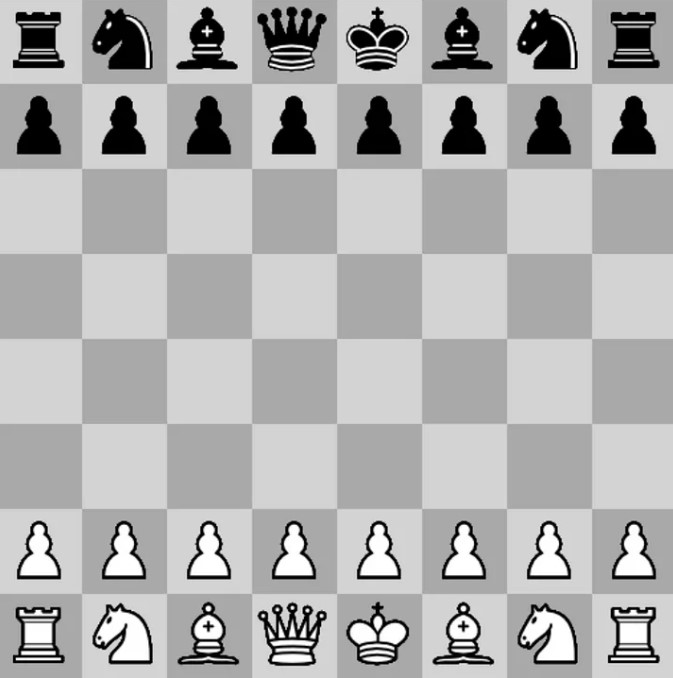
Rendering the board requires only an HTML <canvas> and vanilla JavaScript. No CSS styling is needed and no game-engine framework is involved. The canvas is fixed at 512×512 pixels (as a design choice in this implementation), which means each of the 64 squares is 64×64 — convenient for the piece images.
<html>
<body>
  <canvas width="512" height="512" id="canvas"></canvas>
</body>
</html>
The squares are drawn by iterating over an 8×8 grid (standard chessboard definition) and alternating fill colour using (r + c) % 2. The pieces themselves are awkward to draw as primitives, so we load them as images from a public set and blit each one into the right square using drawImage.
function draw_board() {
    let square_colors = ["LightGray", "DarkGray"];
    context.globalAlpha = 1;
    for (let r = 0; r < dimension; ++r) {
        for (let c = 0; c < dimension; ++c) {
            context.fillStyle = square_colors[(r + c) % 2];
            context.fillRect(
                c * square_width, r * square_height,
                square_width, square_height);
        }
    }
}

function draw_pieces() {
    context.globalAlpha = 1;
    for (let r = 0; r < dimension; ++r) {
        for (let c = 0; c < dimension; ++c) {
            let piece = game_state.board[r][c];
            let piece_image = images[piece];
            if (piece != "--") {
                context.drawImage(
                    piece_image, c * square_width, r * square_height);
            }
        }
    }
}
An init() function wires the canvas, loads the piece images, and triggers the first render once the assets resolve. The body tag calls it on onload. That is the whole rendering layer — about thirty lines once the images are in place.
What does the rules engine actually have to track?
Beginners consistently underestimate the scope of move validation logic. Chess has ordinary moves, captures, pawn promotion, en passant, castling, check, checkmate, stalemate, and draw conditions. Every one of those needs explicit handling. The pattern that scales is a Game_state class that owns the board, the move log, and a set of per-piece move generators.
export class Game_state {
    constructor() {
        this.board = [
            ["bR", "bN", "bB", "bQ", "bK", "bB", "bN", "bR"],
            ["bP", "bP", "bP", "bP", "bP", "bP", "bP", "bP"],
            ["--", "--", "--", "--", "--", "--", "--", "--"],
            ["--", "--", "--", "--", "--", "--", "--", "--"],
            ["--", "--", "--", "--", "--", "--", "--", "--"],
            ["--", "--", "--", "--", "--", "--", "--", "--"],
            ["wP", "wP", "wP", "wP", "wP", "wP", "wP", "wP"],
            ["wR", "wN", "wB", "wQ", "wK", "wB", "wN", "wR"]
        ];
        this.knight_offsets = [
            [ 2,  1], [ 2, -1], [ 1,  2], [ 1, -2],
            [-1,  2], [-1, -2], [-2, -1], [-2,  1]
        ];
    }
}
Squares are strings: "wP" is a white pawn, "--" is empty. Knight offsets are listed because the knight is the one piece whose moves cannot be expressed as a direction-and-distance. The other pieces each get a method that walks outward from the current square along their legal directions, stopping at the first occupied square.
Special moves need to mutate state beyond the obvious from/to. En passant, for example, captures a pawn that is not on the destination square:
if (move.en_passant_move) {
    const direction = this.white_to_move ? 1 : -1;
    this.board[move.end[0] + direction][move.end[1]] = "--";
}
Move validation is the same problem read backwards: enumerate every legal move for the side to move, then accept the user’s click only if it matches one. The generator looks like this:
get_all_possible_moves() {
    let moves = [];
    for (let row = 0; row < this.board.length; ++row) {
        for (let column = 0; column < this.board[row].length; ++column) {
            let player = this.board[row][column][0];
            let current_color = this.white_to_move ? "w" : "b";
            if (player == current_color) {
                let piece = this.board[row][column][1];
                this.move_methods[piece].call(this, row, column, moves);
            }
        }
    }
    return moves;
}
The same generator feeds the UI — highlighting legal destinations when a piece is selected — and the AI’s search, which is the kind of reuse that keeps a small project tractable.
Undo is the last piece. A button in the DOM calls into the game state, which pops the last entry from the move log and reverses whatever side effects that move produced:
export function undo_click() {
    game_state.undo_move();
    made_move = true;
    game_over = false;
    refresh_state();
}
Reversing a promotion is the awkward case — you must restore the pawn and the captured piece both:
if (last_move.promotion_move) {
    const color = this.white_to_move ? "b" : "w";
    this.board[last_move.end[0]][last_move.end[1]] =
        last_move.piece_captured;
    this.board[last_move.start[0]][last_move.start[1]] = color + 'P';
}
This is where most hobby chess engines quietly leak bugs. If undo does not perfectly invert every state change, the AI’s search — which uses make/undo to explore positions — will return wrong scores.
How does the AI opponent learn to play?
A labeled corpus of positions is essential for supervised training. For chess that means recorded games in Portable Game Notation (PGN), available in bulk from public databases. Each game is parsed into a sequence of (position, outcome) pairs. The model’s job is to look at a position and predict how the game ended — roughly, a probability that white wins.
The architecture is intentionally small. Two 2D convolutional layers over an 8×8×12 tensor (by design: one channel per piece type, six per colour), a flatten, two dense layers, and a softmax over two outcomes—a project-specific measurement. This is built in TensorFlow with Keras:
model = models.Sequential()
model.add(layers.Conv2D(filters=32, kernel_size=(3, 3), padding='same',
                        activation='relu', input_shape=(8, 8, 12)))
model.add(layers.Conv2D(filters=32, kernel_size=(5, 5), strides=(1, 1),
                        padding='valid', activation='relu'))
model.add(layers.Flatten())
model.add(layers.Dense(64, activation='relu'))
model.add(layers.Dense(2))
model.add(tf.keras.layers.Softmax())
model.compile(optimizer='adam',
              loss=tf.keras.losses.BinaryCrossentropy(from_logits=True),
              metrics=['accuracy'])
This is closer in spirit to a position-evaluation network than to a full search engine like AlphaZero. There is no Monte Carlo tree search, no policy head, no self-play loop. It learns one thing: given a position, how favourable does it look. That is enough to drive a one-ply selector that beats a beginner and loses to anyone with tactical awareness — which is the point. We are showing the wiring, not chasing Elo.
How does the trained model end up running in the browser?
Train your network in Python, then deploy it in-browser with TensorFlow.js. The Python model is exported and converted into the format TF.js loads. From there, the selector iterates the legal moves, applies each one to a scratch copy of the game state, asks the model to score the resulting position, and picks the highest:
export function find_model_best_move(game_state, valid_moves) {
    let max_score = 0;
    let next_move = null;
    if (!model) return next_move;
    for (const move of valid_moves) {
        let scores;
        let score;
        game_state.make_move(move);
        const input = tf.tensor([ game_state.get_position() ]);
        scores = model.predict(input).arraySync();
        console.assert(scores[0][0] + scores[0][1] >= 0.99);
        score = scores[0][game_state.white_to_move ? 0 : 1];
        if (score > max_score) {
            max_score = score;
            next_move = move;
        }
    }
    return next_move;
}
Two things are worth noticing. The first is that make_move is called without a matching undo_move — this is a bug class to watch for; the production version of the selector either snapshots the board before each candidate or pairs every make with an undo. The second is that the model runs once per legal move, every turn. With around 30 candidate moves per position, that is 30 forward passes per AI turn. On a small CNN like this one the latency is fine. Scale the network up and that loop becomes the bottleneck — the cost of running inference inside a per-move loop in the browser is the constraint, not the architecture itself.
A separate module bundles the JavaScript files together. We use webpack. Any modern bundler will do.
Where this project sits on the GenAI-in-games map
We hand-wire a compact CNN to a classical engine with one-ply search. It is not procedural content generation, not an LLM-driven NPC, not a runtime narrative engine. Compared to the broader picture we cover in Generative AI in Video Games, the chess example sits on the assistive end: the AI is a focused opponent inside a deterministic rule system, with no concern about IP, content moderation, or per-frame inference budgets on a console.
The same shape carries over to more ambitious projects. The rules engine is your simulation; the network is your evaluator; the inference budget is your hard constraint. Studios that succeed with generative AI in production keep that separation clean, as discussed in generative AI tools in modern game creation. Studios that blur the line — running a large model inside the per-frame loop without a fallback — are the ones that hit the cost and latency walls. That production discipline is the same one our Generative & Agentic AI R&D practice applies whenever a client’s roadmap moves past a hand-built evaluator toward a genuinely generative feature.
FAQ
What does it mean to use generative AI in a video game in 2026 — content pipeline, NPCs, runtime generation?
Game development teams deploy generative AI through three distinct integration patterns: offline content generation for designers (textures, level scaffolds, dialogue drafts), assistive tooling inside the editor (engine plugins that propose changes), and constrained runtime generation (mostly dialogue and ambient variation). The chess project here is none of those — it is a classical AI evaluator that happens to be a neural network. The shipping pattern across modern engines is the first two, with runtime generation kept on a tight leash.
Where do AI NPCs work (dialogue, simple behaviour), and where do they break (long-horizon planning)?
LLM-driven dialogue works for one-off exchanges where coherence over a short window is enough. It breaks once the NPC needs to remember commitments across sessions, plan multi-step actions in the world, or stay consistent with quest state — the same long-horizon planning problem we discuss in generative AI and robotics. Studios that ship AI NPCs constrain them to bounded conversational roles.
How does procedural content generation interact with generative AI in modern engines (Unity, Unreal)?
Classical procedural generation (noise functions, grammar-based level design) gives reproducibility — same seed, same level. Generative AI gives variety but breaks reproducibility unless seeded and constrained. The pattern that ships is hybrid: PCG owns the structural skeleton (deterministic, debuggable), generative models populate variation on top (textures, dialogue lines, ambient props).
Which popular games actually ship generative AI features versus are merely marketed as doing so?
Most large-studio “AI features” today are assistive tooling inside the studio’s pipeline, not runtime generation visible to the player. A handful of indie titles use LLM-driven dialogue as a core mechanic. The gap between marketing and ship reality is wide enough that the safest assumption is: if a feature is heavily marketed but the studio has not described its determinism and QA strategy, it is probably an editor-time feature, not a runtime one.
Which pipeline patterns let a studio integrate generative AI without breaking determinism and QA?
The dominant pattern is offline generation with human review: the model produces candidate assets or dialogue, designers approve and lock the chosen outputs, and the locked outputs ship in the build. Runtime generation, when used, is gated behind seeded RNG and a fallback to pre-authored content. QA can then test the deterministic path; the generative path becomes a content source, not a runtime dependency.
Where is the controversy on AI in video games landing — labour, IP, content moderation — by 2026?
The active fronts are training-data provenance (what the model was trained on, and whether that exposes the studio to claims from rights-holders), labour displacement in art and writing roles, and content moderation for any system that lets players prompt an LLM in-game. Studios that ship clean engagements document training-data sources, keep humans in the loop for shipped content, and constrain prompt surfaces to bounded interactions.
What is your next move?
Source code for every step is available on GitHub. If you would rather play against the running engine first, the live version sits under Demos.
Cover image: Felix Mittermeier on Unsplash.