Ask most teams what “industrial computer vision” runs on and they will describe a model. The box on the line — the edge compute, the GPU, the cameras, the I/O — gets treated as something to specify later, after the accuracy target is locked. That ordering is backwards. On an inspection line, the industrial computer is not the thing you buy to run the model you already chose. It is the constraint that decides which models, and therefore which defect classes, you can run at throughput at all.
The divergence shows up at pilot. A pipeline scoped against a benchmark workstation — a tower with a desktop GPU, ambient air, and no duty-cycle pressure — produces accuracy numbers that look fine in the lab. The same pipeline scoped against the box that actually sits on the line, in a sealed enclosure beside a stamping press, ships a sustainable inspection rate. Those are different numbers, and the gap between them is where deployments stall.
What Is an Industrial Computer in a CV Inspection Context?
Think of an industrial computer as the ruggedized inference engine: it pulls frames from cameras, executes model inference on each part, and transmits pass/fail verdicts to the PLC—all within the factory’s dust, vibration, and cycle-time constraints. It is distinguished from a standard PC less by its CPU than by everything around it: ingress protection against dust and coolant mist, a thermal design that holds inference clocks without throttling in a 45 °C cabinet, vibration tolerance near presses and conveyors, and continuous-duty operation measured in years of uninterrupted uptime rather than office hours.
The practical components break down into four:
- The edge box — the enclosure, motherboard, CPU, RAM, storage, and the power and cooling that let it run sealed. This is what carries the IP rating, the operating-temperature range, and the conformal coating.
- The GPU or accelerator — the part that runs inference. On the floor this is usually an embedded or single-slot card with a fixed power and thermal budget, not a 350 W desktop GPU.
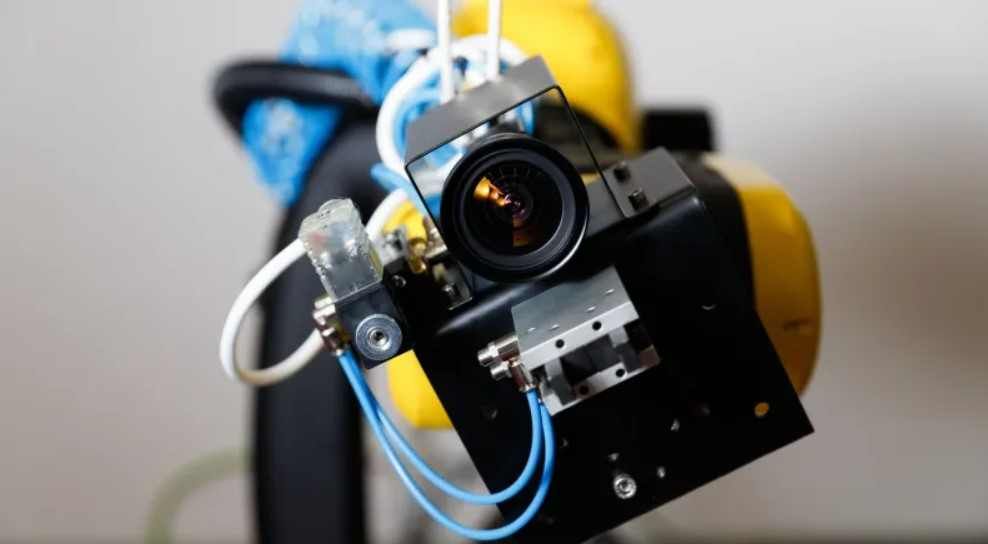
- The cameras — sensor, optics, and lighting, which together fix how much usable signal reaches the model in the first place.
- The I/O — the deterministic links to PLCs, encoders, trigger lines, and reject actuators that turn a model output into a physical action at the right moment.
The mistake is to treat only the GPU as “the compute” and the rest as plumbing. The line’s achievable inspection rate is set by whichever of these four saturates first. A common pattern in our engagements is a team that has sized the GPU generously and then discovers the trigger-to-decision path through the I/O cannot meet the line’s part cadence — the GPU was never the bottleneck.
Machine Vision vs Computer Vision — and Why the Hardware Question Differs
These labels often blur together in vendor literature, yet they describe machines with fundamentally different I/O, thermal design, and failure modes. Classical machine vision — rule-based measurement, template matching, blob analysis — was historically designed to run on modest deterministic hardware, often a smart camera with an embedded DSP. Computer vision in the modern sense, where a learned model classifies or segments defects, moves the compute burden onto a GPU or accelerator because the workload is a neural-network forward pass, not a fixed algorithm. We cover the broader distinction in what machine vision is and how it works in industrial inspection; the point for hardware scoping is that the moment a deep model enters the pipeline, the industrial computer’s compute envelope becomes a first-order feasibility variable rather than a checkbox.
This is why “pick the model accuracy target first, then buy the recommended PC” fails. The accuracy you can sustain is a function of model size, input resolution, and frame rate, and all three are bounded by the box. Scope them in the wrong order and you commit to a defect-class target the hardware cannot serve at line speed.
Which Industrial Computer Constraints Set the Defect-Class Ceiling?
Four constraints, in roughly the order they tend to bite:
Frame rate at line speed. The line moves at a fixed cadence — parts per minute is non-negotiable. That cadence, divided into the inspection window per part, gives you the time budget. If the line indexes a part every 400 ms and you need three camera views inspected per part, you have roughly 130 ms per view end to end, including acquisition, transfer, inference, and decision. The model has to fit inside whatever remains after the fixed overheads — and that remainder, not a lab latency number, is the real constraint.
GPU / accelerator compute budget. Inference latency is governed by the model’s compute graph against the accelerator’s throughput at its thermally sustainable clock, not its boost clock. An embedded accelerator in a sealed cabinet runs at a sustained clock well below what the same silicon hits on an open bench. Quantizing to INT8 and compiling with TensorRT or ONNX Runtime can recover a large fraction of the latency budget, but those gains have to be measured on the target box, not assumed.
Thermal envelope. This is the constraint teams underestimate most. A desktop GPU dumps heat into open air; an industrial box dumps it into a closed enclosure that may already sit at 40–45 °C ambient. Sustained inference under that thermal load forces clock throttling, and throttling silently lowers your frame rate over a shift. The number that matters is sustained throughput at cabinet temperature, not the burst figure from a cool first run — this is an observed-pattern we see repeatedly when a pilot that passed in winter degrades in an un-air-conditioned summer plant.
I/O determinism. The trigger, encoder, and reject paths have to fire within a bounded window or the system rejects the wrong part. Non-deterministic I/O — a USB camera trigger, a network hop without real-time guarantees — introduces jitter that no amount of GPU headroom fixes.
Translating Line Speed into a Per-Part Latency Budget
Here is the worked example, with assumptions made explicit so you can substitute your own numbers.
| Variable | Illustrative value | Source / assumption |
|---|---|---|
| Line cadence | 150 parts/min | Fixed by the process; non-negotiable |
| Time per part | 400 ms | 60,000 ms ÷ 150 |
| Camera views per part | 2 | Front + side inspection |
| Time per view | 200 ms | 400 ms ÷ 2 |
| Acquisition + transfer overhead | ~60 ms | Camera exposure, readout, transfer to GPU memory |
| I/O + decision margin | ~30 ms | Trigger latency, PLC handshake, safety margin |
| Inference budget per view | ~110 ms | Remainder available to the model |
The inference budget — roughly 110 ms in this illustration — is the actual ceiling. A model that runs in 40 ms on a benchmark workstation but 130 ms on the sustained-clock embedded accelerator does not fit, and no accuracy target redeems it. This is the calculation that has to happen before the model is chosen, not after. The feasibility logic that wraps this calculation is the subject of when industrial computer vision inspection actually works — feasibility before pilot, the hub this hardware question feeds.
How Camera and Edge-Compute Choices Move the False-Positive Rate
How many false positives the line will accept depends equally on model calibration and on whether the compute platform can sustain inference speed under thermal load. If the cameras and lighting deliver low-contrast, motion-blurred, or inconsistently illuminated frames, the model is forced to discriminate defects from noise it should never have seen — and the cheapest way it does that is to flag borderline cases, which raises false positives. A line that stops or diverts parts on every false positive loses throughput directly.
Getting the optics, sensor, and lighting right reduces the discrimination burden before any model runs. The mechanics of that — sensor choice, optics, and lighting geometry — are covered in how a machine vision camera works in industrial inspection. The hardware lesson is that spending the budget on camera and lighting quality often does more for the tolerable false-positive rate than spending it on a larger GPU. We see this trade-off mis-weighted regularly: teams over-buy compute and under-buy illumination, then fight false positives the optics could have prevented.
How the Industrial-Computer Cost Breaks Down — and What Drives the Decision
Teams sourcing their first deployment almost always search “industrial computer price,” but actual TCO hinges far more on integration hours, downtime risk, and warranty terms than on the GPU SKU. A rough cost decomposition for a single inspection station:
| Component | Typical share of station cost | What drives it up |
|---|---|---|
| Cameras + optics + lighting | Often the largest single block | Resolution, frame rate, lighting geometry, multiple views |
| Edge box (enclosure, CPU, IP rating, cooling) | Significant | Environmental rating, continuous-duty design, vibration tolerance |
| GPU / accelerator | Moderate | Sustained inference budget, not peak FLOPS |
| I/O + integration | Underestimated | Deterministic links, PLC integration, reject mechanism |
These shares are an observed-pattern across the deployments we have scoped, not a published price survey — your mix shifts with view count and environment. The feasibility-relevant insight is that the GPU is seldom the cost that breaks the business case. Over-specifying GPU capacity the defect set never needed is a common way to inflate the bill of materials while leaving the actual bottleneck — cameras, thermal headroom, or I/O — under-resourced.
Why Scope the Industrial Computer During Feasibility, Not After
Defining hardware requirements early locks in the three metrics that make or break CV inspection ROI: sustained throughput matching line takt time, per-part latency below reject-gate timing, and false-positive rates low enough to avoid operator override. Get the compute and camera envelope right before pilot and you avoid the re-spec cycle — the weeks lost when a model that passed on a workstation cannot hold its frame rate in the cabinet, and the whole hardware decision has to be reopened.
This is the same discipline a performance-and-porting assessment applies before any migration: measure whether the chosen platform can sustain the workload before committing to it. What a performance and porting assessment tells you before you commit to a migration describes that methodology in the porting context; on an inspection line it is what determines whether a candidate industrial computer can actually carry the vision workload at line speed. And the hardware choices made here are not throwaway — they generate the reliability artefacts the line needs at hardening time, the artefacts that keep a line-side model running.
For teams scoping a first deployment, our computer vision practice and how we engage start from this constraint rather than from the model. The industrial-computer profiling step of a feasibility audit measures exactly this: whether the edge compute, cameras, and I/O can sustain the defect-class workload at line speed, before any pilot fires.
FAQ
How does industrial computer vision work, and what does it mean in practice for an inspection line?
A camera captures frames of each part, an industrial computer runs a model to classify or locate defects, and an I/O link turns that decision into a physical action — pass, reject, or divert — within the line’s timing window. In practice it means the model is only one component; the inspection rate is set by whichever of the edge box, GPU, cameras, or I/O saturates first at line speed.
What is an industrial computer in a CV inspection context, and how does it differ from a benchmark workstation?
It is the sealed, continuous-duty compute platform that runs inference on the factory floor inside the plant’s thermal, ingress, and vibration envelope. A benchmark workstation runs the same model in open air at boost clocks with no duty-cycle pressure, so its latency numbers overstate what the line can sustain — the industrial box runs at a lower, thermally stable clock and ships the real inspection rate.
Which industrial computer constraints set the ceiling on feasible defect classes?
Frame rate at line speed, the GPU or accelerator’s sustained compute budget, the thermal envelope of the enclosure, and the determinism of the I/O. The line’s achievable inspection rate is fixed by whichever of these saturates first, and that ceiling — not a lab accuracy target — bounds which defect classes you can inspect at throughput.
How does line speed translate into a per-part inference latency budget?
Divide the line cadence into time per part, split that across the camera views per part, then subtract acquisition, transfer, and I/O overhead. The remainder is the inference budget per view — for example, a 150-parts-per-minute line with two views leaves roughly 110 ms for the model, and any model that exceeds that on the target box does not fit regardless of its accuracy.
Why should the industrial computer be scoped during feasibility rather than after a model accuracy target is chosen?
Because the achievable accuracy is itself a function of model size, resolution, and frame rate, all of which the hardware bounds. Choosing the accuracy target first commits you to a defect-class goal the box may not be able to serve at line speed, forcing a re-spec cycle that stalls deployment by weeks.
How do camera and edge-compute choices affect the false-positive rate the line can tolerate at throughput?
If cameras and lighting deliver low-contrast or inconsistent frames, the model must discriminate defects from noise and tends to flag borderline parts, raising false positives that cost throughput. Spending budget on optics and lighting often reduces the tolerable false-positive burden more effectively than buying a larger GPU.
How does the cost of an industrial computer break down, and which component drives the feasibility decision?
Across the deployments we have scoped, cameras-plus-optics-plus-lighting and the environmentally-rated edge box are usually the largest blocks, with the GPU and I/O moderate but the I/O frequently underestimated. The GPU is seldom what breaks the business case — over-specifying it inflates the bill of materials while the real bottleneck is more often thermal headroom, camera quality, or deterministic I/O.
How does an industrial computer differ from a standard PC in ways that matter on an inspection line?
It carries ingress protection against dust and coolant, a thermal design that holds inference clocks without throttling in a hot sealed cabinet, vibration tolerance near presses and conveyors, and continuous-duty operation rated in years of uptime. A standard PC may match it on raw compute but cannot sustain that compute under the floor’s environmental load.
Specify the model first and the box becomes a compromise you discover at pilot. Specify the box — frame rate, thermal envelope, sustained inference budget, deterministic I/O — and the question becomes the right one: given what this line actually runs on, which defect classes can we inspect at throughput, and what does it cost to widen that ceiling?
Next time Industrial Computer Vision Hardware comes up
Most expensive hardware failures trace back to decisions made weeks before testing: unclear throughput targets, unvalidated environmental specs, or success criteria borrowed from a different production environment.