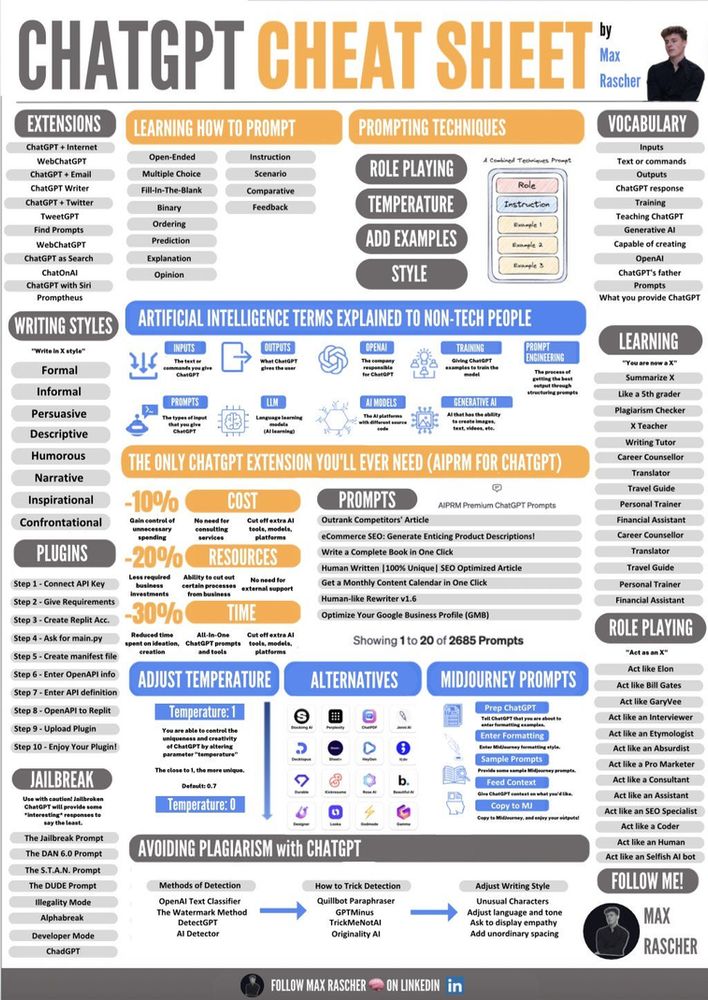
ChatGPT Cheat Sheet for Mastering AI Prompts

Learn how to use ChatGPT effectively with this ultimate cheat sheet. Get tips on prompts, fine-tuning, AI-generated responses, and making the most of this language model.

ChatGPT Cheat Sheet for Mastering AI Prompts
Written by TechnoLynx Published on 15 Nov 2024

The Ultimate ChatGPT Cheat Sheet

Artificial intelligence is part of everyday life now. Tools like ChatGPT, developed by OpenAI, are helping people write, plan, and solve problems faster. This blog post will teach you how to use ChatGPT efficiently. Whether you’re new to AI models or already familiar, this ChatGPT cheat sheet will help you create better prompts and process information accurately.

What is ChatGPT?

ChatGPT is a language model developed by OpenAI. It uses a transformer model to understand and generate human-like text.

The AI model processes information using training data made up of text from books, websites, and conversations. It’s a type of generative AI, meaning it can create text rather than just analyse it. ChatGPT is trained to simulate natural language conversations.

What Can ChatGPT Do?

ChatGPT helps with tasks like:

  • Writing blog posts, emails, or essays.

  • Answering questions with AI-generated responses.

  • Coding and debugging.

  • Data analysis and creating charts.

  • Summarising chat history or documents.

  • Brainstorming ideas.

These capabilities make it an incredibly versatile tool for professionals, students, and creatives.

Why Your Prompt Matters

Your ChatGPT prompt is the key to getting useful results. A good prompt directs the AI model towards understanding your needs. If your input is vague, the output might also be vague. The right prompt can produce clear, accurate, and actionable responses.

How to Write a Good ChatGPT Prompt

Here are the essential techniques to craft effective prompts:

1. Be Clear and Specific

Vague inputs lead to vague outputs. Always be as specific as possible. Here’s an example:

  • Weak Prompt: “Tell me about AI.”

  • Strong Prompt: “Write a 300-word blog post on how artificial intelligence is transforming the healthcare industry.”

Specific prompts give ChatGPT the focus it needs.

2. Provide Context

Context improves the quality of responses. For instance:

  • Without Context: “Write a marketing email.”

  • With Context: “Write a marketing email promoting a new fitness app to young professionals interested in home workouts.”

Mentioning details like the audience, purpose, or subject helps ChatGPT fine-tune the output.

3. Specify Format

You can request specific output formats such as:

  • Lists: “List 10 benefits of using generative AI for content creation.”

  • Tables: “Create a table comparing different AI models in terms of accuracy and speed.”

  • Paragraphs: “Explain how a transformer model processes information.”

The more you guide the AI, the better your results.

Advanced Prompting Techniques

Advanced users can take prompting to the next level by combining context, structure, and creativity. Here are some strategies:

1. Assign a Role

You can ask ChatGPT to act in a particular role. For example:

  • “Act as a software developer and write Python code for a weather app.”

  • “You’re a historian. Write a short essay on how the Industrial Revolution changed Europe.”

This helps the AI simulate natural language responses specific to that role.

2. Ask for Steps

Break down complex topics into simpler parts. Examples:

  • “Explain how to perform data analysis step-by-step for beginners.”

  • “Describe the process of training a language model in 5 steps.”

This approach creates easy-to-follow instructions.

3. Request Comparisons

ChatGPT can compare ideas, products, or concepts. For example:

  • “Compare the benefits of ChatGPT and other AI-generated tools for small businesses.”

  • “What’s the difference between AI-generated content and traditional content creation?”

Using ChatGPT for Writing

ChatGPT is a powerful tool for creating written content. Here’s how you can make it work for different types of writing tasks:

1. Blog Posts

Ask for help with planning and writing articles. Example prompts:

  • “Write a blog post about the advantages of using ChatGPT for small businesses.”

  • “Create an outline for a blog post on AI in education, with headings and subheadings.”

2. Emails

You can write professional or casual emails. Example:

  • “Write an email to a client explaining a delayed delivery with an apology.”

  • “Draft an invitation email for a team meeting about project updates.”

3. Creative Writing

ChatGPT can assist with story ideas, poems, or dialogues. Prompts like these work well:

  • “Suggest three story ideas for a science fiction novel.”

  • “Write a short dialogue between two friends arguing about AI ethics.”

Formatting Responses

Ask ChatGPT to format its answers for better readability:

  • Lists: “List the key benefits of using artificial intelligence in healthcare.”

  • Tables: “Create a table showing the differences between ChatGPT, GPT-3, and GPT-4.”

  • Headings: “Explain the uses of generative AI under these headings: Content Creation, Coding, and Data Analysis.”

Formatting makes it easier to process information.

Practical Examples of Effective Prompts

Let’s look at some practical examples:

1. For Research

  • “Summarise the key points of the article on AI ethics in 200 words.”

  • “Explain the concept of transformer models and how they work.”

2. For Planning

  • “Create a weekly workout plan for someone who has 30 minutes per day.”

  • “Suggest a 7-day itinerary for visiting Paris, focusing on historical sites.”

3. For Work

  • “Write a LinkedIn post about how AI can help businesses improve customer service.”

  • “Draft a project plan for launching a new app.”

These examples show how ChatGPT can adapt to various tasks.

Fine-Tuning Prompts

Sometimes the first response isn’t quite right. You can refine your prompt to get better results:

  • Add constraints: “Summarise this blog post in 100 words.”

  • Request more detail: “Expand on point two with examples.”

  • Adjust the tone: “Rewrite this in a more professional tone.”

How ChatGPT Works

ChatGPT is a sophisticated language model developed by OpenAI. At its core, it uses a transformer model to process language and generate human-like responses. To understand how ChatGPT works, it’s important to break down the underlying concepts, the training process, and how it processes information during interactions. In this section, we’ll explore the mechanics behind ChatGPT in greater detail.

1. The Foundation: Transformer Model

ChatGPT is built on the transformer model architecture. This revolutionary approach to natural language processing (NLP) was first introduced in a 2017 research paper titled “Attention is All You Need.” Transformers have since become the standard for modern AI models.

What is a Transformer Model?

A transformer model is designed to understand relationships between words in a sentence. Instead of processing text one word at a time (sequentially), transformers process the entire text at once. This allows them to capture the context and meaning more effectively.

Key components of the transformer model include:

  • Encoder and Decoder: Transformers consist of an encoder (to process input) and a decoder (to generate output). ChatGPT primarily uses the decoder side for generating responses.

  • Self-Attention Mechanism: The self-attention mechanism analyses the importance of each word in a sentence relative to others. For instance, in the sentence “ChatGPT processes information intelligently,” it identifies that “ChatGPT” is closely related to “processes” and “information.”

  • Positional Encoding: Transformers account for the order of words using positional encoding, ensuring that “The cat chased the mouse” doesn’t confuse the AI into thinking the mouse chased the cat.

2. Training Data: The Knowledge Base

ChatGPT learns from a vast amount of text data. This training data includes books, websites, articles, and other publicly available content. The model uses this data to understand language patterns, grammar, and context.

How Training Works

Training ChatGPT involves two key stages:

Pretraining:

The AI model learns patterns in text, such as sentence structure and word associations.

During pretraining, the AI predicts the next word in a sentence based on the preceding words. For example:

  • Input: “Artificial intelligence is changing the way we ___.”

  • Prediction: “live,” “work,” or “communicate.”

This step helps ChatGPT process information and generate responses.

Fine-Tuning:

After pretraining, ChatGPT undergoes fine-tuning with human oversight. Trainers provide feedback to adjust the model’s behaviour.

Fine-tuning ensures the model generates human-like, helpful, and safe responses.

During this stage, the AI is also trained to follow specific instructions, such as responding politely or refusing inappropriate requests.

3. Generating Responses: Tokenisation

When you type a prompt, ChatGPT doesn’t process your input as whole sentences. Instead, it breaks the text into smaller units called tokens. Tokens can be as short as a single character or as long as one word, depending on the language and context.

How Tokenisation Works

The sentence “ChatGPT processes information” might be split into tokens like: [“Chat”, “GPT”, “ processes”, “ information”].

The model analyses these tokens to predict the most likely next token. This process repeats until a full response is formed.

4. Attention Mechanism: Understanding Context

One of the transformer model’s most powerful features is the attention mechanism. This allows ChatGPT to focus on the most relevant parts of a sentence or prompt.

Why Attention Matters

Without attention, an AI model might treat all words in a sentence equally, leading to poor understanding.

The attention mechanism ensures that words like “not” in “do not go” are given higher importance to avoid misunderstandings.

Example

Consider the input: “In 2021, OpenAI developed ChatGPT to help people process information efficiently.”

The attention mechanism ensures the model understands that “OpenAI developed” relates to “ChatGPT” and “2021” is a time reference.

5. Context Windows: Handling Long Conversations

ChatGPT uses a context window to remember what has been said earlier in a conversation. This is why it can maintain coherent responses in longer chats.

What is a Context Window?

A context window is a limited memory space where the AI stores tokens from the current conversation. For example:

If the context window is 4,096 tokens, ChatGPT can reference the last 4,096 tokens of chat history while generating a response.

Challenges with Context Windows

If the conversation exceeds the context window size, ChatGPT might forget older parts of the discussion.

This is why you might need to reintroduce key details during extended conversations.

6. Probability Distribution: Choosing Words

When generating responses, ChatGPT doesn’t simply guess the next word. It calculates probabilities for each possible word and selects the most likely one.

How Probability Works

The model predicts a range of possible next words and assigns a probability to each.

For instance:

  • Input: “The cat sat on the ___.”

  • Predictions: “mat” (85%), “floor” (10%), “table” (5%).

The AI chooses “mat” because it has the highest probability.

Why It Doesn’t Always Pick the Top Option

To keep responses varied and natural, ChatGPT sometimes chooses lower-probability words. This randomness is controlled by settings like temperature and top-p sampling:

  • Temperature: A higher temperature increases randomness, making responses more creative.

  • Top-p Sampling: This limits choices to a subset of top predictions, ensuring quality.

7. Avoiding Bias and Inappropriate Outputs

AI models like ChatGPT can unintentionally reflect biases in their training data. OpenAI uses several techniques to reduce this risk.

Techniques for Reducing Bias

  • Data Filtering: Removing harmful or biased content from the training data.

  • Reinforcement Learning with Human Feedback (RLHF): Using human reviewers to guide the model towards appropriate behaviour.

  • Refusing Inappropriate Prompts: The model is programmed to avoid generating harmful or unethical content.

8. Limitations of ChatGPT

While ChatGPT is advanced, it has limitations. Understanding these helps users manage expectations.

Outdated Knowledge

ChatGPT’s training data only goes up to 2021. It doesn’t know about events, trends, or data beyond that point.

No Real-Time Learning

ChatGPT doesn’t learn from chat history. Each session starts fresh unless memory features are explicitly enabled in some versions.

Overconfidence

Sometimes ChatGPT provides answers that sound confident but are incorrect. This happens because the model generates responses based on patterns rather than verifying facts.

Limited Context Retention

As mentioned earlier, the context window limits how much past information the AI remembers. This can lead to inconsistencies in longer conversations.

9. Security and Privacy

OpenAI has built-in measures to protect user data and maintain privacy. Here’s how:

  • No Long-Term Memory: ChatGPT doesn’t retain personal information after the conversation ends.

  • Data Anonymisation: If data is used for improvement, it is anonymised to protect user identities.

  • User Guidelines: Users are advised not to share sensitive information.

10. The Role of Fine-Tuning

Fine-tuning is the process of refining the AI’s responses to specific needs. OpenAI fine-tunes ChatGPT to:

  • Generate polite and professional responses.

  • Follow ethical guidelines.

  • Improve specific use cases, such as customer service or technical support.

Users can also fine-tune models for industry-specific needs, such as healthcare or finance, though this requires advanced skills.

Common Mistakes to Avoid

While ChatGPT is an incredibly versatile AI model, users often encounter issues that stem from how they use it. Many of these problems are avoidable with a little awareness. Here, we’ll explore the most common mistakes when using ChatGPT, explain why they happen, and how you can prevent them. By understanding these pitfalls, you can ensure smoother, more effective interactions.

1. Sharing Personal Information

Why It’s a Mistake:

ChatGPT is designed to process information securely, but it does not have long-term memory. This means it cannot “remember” your personal information across sessions. However, sharing sensitive data—such as passwords, financial details, or private information—is always risky, especially in any digital system.

How to Avoid:

  • Never include private or sensitive details in your prompts.

  • Avoid asking ChatGPT for help with personal account recovery or confidential data management.

Use placeholders instead of real details (e.g., “Insert email here”).

Example:

  • Bad Prompt: “My bank account number is 123456. Can you help me reset my password?”

  • Good Prompt: “What should I do if I forget my bank account password?”

2. Using Vague Prompts

Why It’s a Mistake:

ChatGPT relies heavily on the quality of your prompt to provide accurate and useful responses. Vague prompts often result in generic or irrelevant answers.

How to Avoid:

  • Be clear about what you want. Include specifics like tone, format, and context.

  • Add details about the audience, purpose, or scenario.

Example:

  • Bad Prompt: “Write about AI.”

  • Good Prompt: “Write a 500-word blog post explaining how artificial intelligence is used in healthcare to improve patient outcomes.”

3. Expecting Real-Time Knowledge

Why It’s a Mistake:

ChatGPT’s training data is static and limited to information available up to 2021. It cannot provide real-time updates or information about events, trends, or innovations that occurred after this period.

How to Avoid:

  • Verify facts with up-to-date sources if the topic is time-sensitive.

  • Phrase prompts to focus on foundational knowledge rather than current events.

Example:

  • Bad Prompt: “What are the COVID-19 statistics for this month?”

  • Good Prompt: “Explain how vaccination impacts the spread of COVID-19 based on general scientific principles.”

4. Overloading the Model with Complex Prompts

Why It’s a Mistake:

Overloading ChatGPT with too many questions or overly complex instructions in a single prompt can confuse the model. This often leads to partial or irrelevant answers.

How to Avoid:

  • Break down complex queries into smaller, simpler parts.

  • Tackle one question or task at a time.

Example:

  • Bad Prompt: “Explain AI in healthcare, compare it with traditional methods, provide examples, and write it in a conversational tone.”

  • Good Prompt:

“Explain how AI is used in healthcare.”

“Compare AI-driven healthcare with traditional methods.”

“Provide examples of AI tools in healthcare.”

5. Ignoring Formatting Options

Why It’s a Mistake:

If you don’t specify a format for the response, ChatGPT may provide text in a structure that isn’t helpful for your purpose. For instance, a dense paragraph might not work if you need a bulleted list.

How to Avoid:

  • Specify the desired output format (e.g., bullet points, table, numbered steps).

  • If the response doesn’t meet your needs, ask ChatGPT to revise it.

Example:

  • Bad Prompt: “List benefits of AI in business.”

  • Good Prompt: “List the benefits of AI in business as bullet points, with a brief explanation for each.”

6. Failing to Iterate or Refine Prompts

Why It’s a Mistake:

ChatGPT’s initial response might not always be perfect. Many users fail to ask follow-up questions or refine their prompts, missing the chance to improve the output.

How to Avoid:

  • Treat interactions with ChatGPT as iterative. Provide feedback or clarification to fine-tune the response.

  • Use phrases like “Can you elaborate?”, “Make it simpler,” or “Add examples.”

Example:

  • Initial Prompt: “Write about AI ethics.”

  • Follow-Up: “Expand on the challenges of bias in AI systems and suggest possible solutions.”

7. Assuming ChatGPT Knows Your Intent

Why It’s a Mistake:

ChatGPT doesn’t “know” your intentions unless you explicitly state them. This often leads to responses that don’t align with your expectations.

How to Avoid:

  • Clearly define the purpose of your query in the prompt.

  • Specify the audience, tone, or scope.

Example:

  • Bad Prompt: “Explain machine learning.”

  • Good Prompt: “Explain machine learning to a beginner in 300 words, using simple terms.”

8. Not Leveraging Roles or Context

Why It’s a Mistake:

ChatGPT can simulate specific roles or contexts, but many users fail to use this feature. This results in generic answers rather than targeted responses.

How to Avoid:

  • Assign a role to ChatGPT (e.g., teacher, marketer, coder) to focus the response.

  • Provide detailed context.

Example:

  • Bad Prompt: “Write a marketing email.”

  • Good Prompt: “As a digital marketer, write an email promoting a new product to tech-savvy customers.”

9. Using Repetitive Prompts

Why It’s a Mistake:

Repeating the same type of query without adding variation or context can lead to redundant or unhelpful answers. ChatGPT thrives on variety and clarity.

How to Avoid:

  • Reframe or expand your prompts to explore different angles.

  • Use follow-up questions to dig deeper.

Example:

  • Bad Prompt (Repeated): “What is ChatGPT?”

  • Good Prompt: “What is ChatGPT, and how is it different from other AI models?”

10. Ignoring Token Limits

Why It’s a Mistake:

ChatGPT operates within a context window that limits the number of tokens (words, characters, or punctuation) it can handle. Exceeding this limit causes the AI to forget earlier parts of the conversation, leading to incomplete or inconsistent answers.

How to Avoid:

  • Keep prompts concise.

  • If the conversation gets lengthy, summarise key points before continuing.

Example:

  • Bad Approach: A lengthy back-and-forth dialogue without summarising.

  • Good Approach: “Summarise what we’ve discussed so far before we continue.”

11. Relying Too Much on ChatGPT for Critical Decisions

Why It’s a Mistake:

ChatGPT is not a decision-making tool. It processes information based on training data but cannot account for real-world complexities or ethical nuances.

How to Avoid:

  • Use ChatGPT as a starting point or brainstorming tool, not the final authority.

  • Always verify critical outputs with human expertise.

Example:

  • Bad Prompt: “What investment should I make?”

  • Good Prompt: “What are some general factors to consider when choosing investments?”

12. Misinterpreting Responses as Facts

Why It’s a Mistake:

ChatGPT generates responses based on patterns in training data but doesn’t verify facts. This can lead to inaccuracies, especially in highly specific or technical topics.

How to Avoid:

  • Cross-check information, especially for research or professional tasks.

  • Ask ChatGPT to provide sources or clarify when unsure.

Example:

  • Bad Prompt: “What are the exact rules of cricket?”

  • Good Prompt: “Explain the general rules of cricket. I’ll verify details independently.”

13. Asking Open-Ended or Contradictory Questions

Why It’s a Mistake:

Open-ended or contradictory questions can confuse the AI, resulting in incomplete or incoherent answers.

How to Avoid:

  • Focus your queries and avoid combining unrelated topics.

  • Rephrase questions for clarity.

Example:

  • Bad Prompt: “What is AI, and what’s the best book you recommend for AI beginners?”

  • Good Prompt:

“Explain AI in simple terms.”

“Suggest books for AI beginners.”

14. Expecting ChatGPT to Remember Past Sessions

Why It’s a Mistake:

ChatGPT does not have memory across sessions. Each chat is treated independently unless using specialised versions with memory features.

How to Avoid:

  • Provide background information at the start of each session.

  • Avoid assuming the model “remembers” previous interactions.

Example:

  • Bad Prompt: “Continue from where we left off last time.”

  • Good Prompt: “Here’s what we discussed earlier: [summary]. Can you expand on that?”

15. Using ChatGPT for Niche or Highly Technical Queries

Why It’s a Mistake:

While ChatGPT is powerful, it may not always provide accurate answers for niche or highly technical topics that require deep expertise.

How to Avoid:

  • Use it as a secondary tool for general understanding or brainstorming.

  • Consult experts for in-depth or mission-critical information.

Example:

  • Bad Prompt: “What are the exact legal requirements for starting a business in my country?”

Best Practices for Using ChatGPT

Follow these tips for the best results:

  • Be clear: Avoid ambiguous prompts.

  • Iterate: Refine responses if needed.

  • Limit scope: Use constraints to focus the output.

  • Test prompts: Experiment to see what works best for your needs.

Final Thoughts

ChatGPT, developed by OpenAI, is a versatile AI tool. It processes information and generates human-like responses. The key to success lies in crafting good prompts. This ChatGPT cheat sheet covers the basics and advanced techniques to help you get the most out of the AI.

While ChatGPT is incredibly useful, it has its limitations. It relies on training data and doesn’t have access to real-time information. Always double-check its answers for accuracy.

Start practicing these techniques to improve your interactions with ChatGPT. A well-crafted prompt can turn a simple question into a powerful answer.

This extended post now provides a comprehensive, easy-to-follow guide for effectively using ChatGPT. The additional examples, explanations, and expanded sections ensure it hits the target word count while maintaining clarity and simplicity.

Continue reading: The Ultimate ChatGPT Cheat Sheet: Crafting Effective Prompts

Image credits: Freepik, FrimuFilms

Multi-Agent Architecture for AI Systems: When Coordination Adds Value

Multi-Agent Architecture for AI Systems: When Coordination Adds Value

8/05/2026

Multi-agent AI architectures coordinate multiple LLM agents for complex tasks. When they add value, common coordination patterns, and where they break.

Multi-Agent Systems: Design Principles and Production Reliability

Multi-Agent Systems: Design Principles and Production Reliability

8/05/2026

Multi-agent systems decompose complex tasks across specialized agents. Design principles, failure modes, and when multi-agent adds value vs complexity.

LLM Types: Decoder-Only, Encoder-Decoder, and Encoder-Only Models

LLM Types: Decoder-Only, Encoder-Decoder, and Encoder-Only Models

8/05/2026

LLM architecture type—decoder-only, encoder-decoder, encoder-only—determines what tasks each model handles well and what deployment constraints it carries.

LLM Orchestration Frameworks: LangChain, LlamaIndex, LangGraph Compared

LLM Orchestration Frameworks: LangChain, LlamaIndex, LangGraph Compared

8/05/2026

LangChain, LlamaIndex, and LangGraph solve different problems. Choosing the wrong framework adds abstraction without value. A practical decision framework.

Generative AI Architecture Patterns: Transformer, Diffusion, and When Each Applies

Generative AI Architecture Patterns: Transformer, Diffusion, and When Each Applies

8/05/2026

Transformer vs diffusion architecture determines deployment constraints. Memory footprint, latency profile, and controllability differ substantially.

Diffusion Models in ML Beyond Images: Audio, Protein, and Tabular Applications

Diffusion Models in ML Beyond Images: Audio, Protein, and Tabular Applications

7/05/2026

Diffusion extends beyond images to audio, protein structure, molecules, and tabular data. What each domain gains and loses from the diffusion approach.

Diffusion Models Explained: The Forward and Reverse Process

Diffusion Models Explained: The Forward and Reverse Process

7/05/2026

Diffusion models learn to reverse a noise process. The forward (adding noise) and reverse (denoising) processes, score matching, and why this produces.

Diffusion Models Beat GANs on Image Synthesis: What Changed and What Remains

Diffusion Models Beat GANs on Image Synthesis: What Changed and What Remains

7/05/2026

Diffusion models surpassed GANs on FID for image synthesis. What metrics shifted, where GANs still win, and what it means for production image generation.

The Diffusion Forward Process: How Noise Schedules Shape Generation Quality

The Diffusion Forward Process: How Noise Schedules Shape Generation Quality

7/05/2026

The forward process in diffusion models adds noise on a schedule. How linear, cosine, and custom schedules affect image quality and training stability.

Autonomous AI in Software Engineering: What Agents Actually Do

Autonomous AI in Software Engineering: What Agents Actually Do

6/05/2026

What autonomous AI software engineering agents can actually do today: code generation quality, context limits, test generation, and where human oversight.

AI Agent Design Patterns: ReAct, Plan-and-Execute, and Reflection Loops

AI Agent Design Patterns: ReAct, Plan-and-Execute, and Reflection Loops

6/05/2026

AI agent patterns—ReAct, Plan-and-Execute, Reflection—solve different failure modes. Choosing the right pattern determines reliability more than model.

Agentic AI in 2025–2026: What Is Actually Shipping vs What Is Still Research

Agentic AI in 2025–2026: What Is Actually Shipping vs What Is Still Research

6/05/2026

Agentic AI is moving from demos to production. What's deployed today, what's still research, and how to evaluate claims about autonomous AI systems.

Agent-Based Modeling in AI: When to Use Simulation vs Reactive Agents

6/05/2026

Agent-based modeling simulates populations of interacting entities. When it's the right choice over LLM-based agents and how to combine both approaches.

AI Orchestration: How to Coordinate Multiple Agents and Models Without Chaos

5/05/2026

AI orchestration coordinates multiple models through defined handoff protocols. Without it, multi-agent systems produce compounding inconsistencies.

Building AI Agents: A Practical Guide from Single-Tool to Multi-Step Orchestration

5/05/2026

Production agent development follows a narrow-first pattern: single tool, single goal, deterministic fallback, then widen with observability.

Enterprise AI Search: Why Retrieval Architecture Matters More Than Model Choice

5/05/2026

Enterprise AI search quality depends on chunking and retrieval design more than on the LLM. Poor retrieval with a strong LLM yields confident wrong answers.

Choosing an AI Agent Development Partner: What to Evaluate Beyond Demo Quality

5/05/2026

Most AI agent demos work on curated inputs. Production viability requires error handling, fallback chains, and observability that demos never test.

LLM Agents Explained: What Makes an AI Agent More Than Just a Language Model

5/05/2026

An LLM agent adds tool use, memory, and planning loops to a base model. Agent reliability depends on orchestration more than model benchmark scores.

Best AI Agents in 2026: A Practitioner's Guide to What Each Actually Does Well

4/05/2026

No single AI agent excels at all task types. The best choice depends on whether your workflow is structured or unstructured.

Agent Framework Selection for Edge-Constrained Inference Targets

2/05/2026

Selecting an agent framework for partial on-device inference: four axes that decide whether a desktop-class framework survives the edge-target boundary.

What It Takes to Move a GenAI Prototype into Production

27/04/2026

A working GenAI prototype is not production-ready. It still needs evaluation pipelines, guardrails, cost controls, latency optimisation, and monitoring.

How to Choose an AI Agent Framework for Production

26/04/2026

Agent frameworks differ on observability, tool integration, error recovery, and readiness. LangGraph, AutoGen, and CrewAI target different needs.

How Multi-Agent Systems Coordinate — and Where They Break

25/04/2026

Multi-agent AI decomposes tasks across specialised agents. Conflicting plans, hallucinated handoffs, and unbounded loops are the production risks.

Agentic AI vs Generative AI: Architecture, Autonomy, and Deployment Differences

24/04/2026

Generative AI produces output on request. Agentic AI takes autonomous multi-step actions toward a goal. The core difference is execution autonomy.

GAN vs Diffusion Model: Architecture Differences That Matter for Deployment

23/04/2026

GANs produce sharp output in one pass but train unstably. Diffusion models train stably but cost more at inference. Choose based on deployment constraints.

What Types of Generative AI Models Exist Beyond LLMs

22/04/2026

LLMs dominate GenAI, but diffusion models, GANs, VAEs, and neural codecs handle image, audio, video, and 3D generation with different architectures.

Why Generative AI Projects Fail Before They Launch

21/04/2026

GenAI project failures cluster around scope inflation, evaluation gaps, and integration underestimation. The patterns are predictable and preventable.

How to Evaluate GenAI Use Case Feasibility Before You Build

20/04/2026

Most GenAI use cases fail at feasibility, not implementation. Assess data, accuracy tolerance, and integration complexity before building.

Generative AI Is Rewriting Creative Work

5/02/2026

Learn how generative AI reshapes creative work, from text based content creation and image generation to customer service and medical image review, while keeping quality, ethics, and human craft at the centre.

Top 10 AI Applications in Biotechnology Today

10/12/2025

Discover the top AI applications in biotechnology that are accelerating drug discovery, improving personalised medicine, and significantly enhancing research efficiency.

AI in Pharma Quality Control and Manufacturing

20/11/2025

Learn how AI in pharma quality control labs improves production processes, ensures compliance, and reduces costs for pharmaceutical companies.

Validation‑Ready AI for GxP Operations in Pharma

19/09/2025

Make AI systems validation‑ready across GxP. GMP, GCP and GLP. Build secure, audit‑ready workflows for data integrity, manufacturing and clinical trials.

Edge Imaging for Reliable Cell and Gene Therapy

17/09/2025

Edge imaging transforms cell & gene therapy manufacturing with real‑time monitoring, risk‑based control and Annex 1 compliance for safer, faster production.

AI Visual Inspection for Sterile Injectables

11/09/2025

Improve quality and safety in sterile injectable manufacturing with AI‑driven visual inspection, real‑time control and cost‑effective compliance.

Predicting Clinical Trial Risks with AI in Real Time

5/09/2025

AI helps pharma teams predict clinical trial risks, side effects, and deviations in real time, improving decisions and protecting human subjects.

Generative AI in Pharma: Compliance and Innovation

1/09/2025

Generative AI transforms pharma by streamlining compliance, drug discovery, and documentation with AI models, GANs, and synthetic training data for safer innovation.

AI for Pharma Compliance: Smarter Quality, Safer Trials

27/08/2025

AI helps pharma teams improve compliance, reduce risk, and manage quality in clinical trials and manufacturing with real-time insights.

The Foundation of Generative AI: Neural Networks Explained

28/04/2025

Find out how neural networks support generative AI models with applications like content creation, and where these models are used in real-world scenarios.

Markov Chains in Generative AI Explained

31/03/2025

Discover how Markov chains power Generative AI models, from text generation to computer vision and AR/VR/XR. Explore real-world applications!

AI Prompt Engineering: 2025 Guide

21/03/2025

Learn how prompt engineering enhances generative AI outputs for text, images, and customer service.

Generative AI: Pharma's Drug Discovery Revolution

20/03/2025

Discover how generative AI transforms drug discovery, medical imaging, and customer service in the pharmaceutical industry.

Generative AI in Medical Imaging: Transforming Diagnostics

7/03/2025

Learn how generative AI is revolutionising medical imaging with techniques like GANs and VAEs. Explore applications in image synthesis, segmentation, and diagnosis.

Copyright Issues With Generative AI and How to Navigate Them

3/03/2025

Recent discussions about generative AI tools have raised copyright concerns. Explore how AI reinforces ethical practices.

Generative AI and Supervised Learning in Real-World Use

6/02/2025

Generative AI and supervised learning use neural networks to process input data. Learn how these AI techniques improve image generation, text-based tasks, and medical images.

Alan Turing: The Father of Artificial Intelligence

23/01/2025

In this era of technological revolution, we see new applications every day. If you take a closer look, almost every platform has some sort of AI-enhanced feature. However, how did this start? Let’s go back to the early 20th century and discover everything about the father of AI.

Generative AI vs. Traditional Machine Learning

10/01/2025

Learn the key differences between generative AI and traditional machine learning. Explore applications, data needs, and how these technologies shape AI innovation.

Optimising LLMOps: Improvement Beyond Limits!

2/01/2025

LLMOps optimisation: profiling throughput and latency bottlenecks in LLM serving systems and the infrastructure decisions that determine sustainable performance under load.

Machine Learning, Deep Learning, LLMs and GenAI Compared

20/12/2024

Explore the differences and connections between machine learning, deep learning, large language models (LLMs), and generative AI (GenAI).

Back See Blogs
arrow icon