A trained PyTorch or TensorFlow model is not yet an iOS feature. Between the checkpoint and the device sits a conversion step, and on Apple platforms that step is owned by coremltools — a Python package whose job is to turn an existing model graph into a Core ML model that can run against the CPU, the GPU, and, when the operator coverage allows, the Apple Neural Engine. This article walks through what coremltools actually does, where it sits in a cross-platform inference pipeline, and what to watch for when the conversion silently changes how a model behaves on-device.
At TechnoLynx, we hit this conversion step regularly when shipping computer vision and generative models into iOS and macOS applications. The model is trained once in PyTorch or TensorFlow; it then has to land on whatever runtime the deployment target dictates. For Apple devices, that runtime is Core ML, and coremltools is the bridge. This kind of cross-platform porting work sits inside our broader media and telecom engineering practice, where the same conversion step decides whether a model ships on time. The piece below uses a small diffusion model trained on faces as the worked example, but the conversion pattern is the same for any architecture you would realistically ship.
What does coremltools actually do?
coremltools is a Python package developed by Apple that converts models from popular training frameworks — PyTorch, TensorFlow, scikit-learn — into the Core ML .mlmodel (or newer .mlpackage) format. Once a model is in that format, Core ML on the device is responsible for scheduling it across the available compute units: CPU, GPU, and the Apple Neural Engine (ANE), Apple’s on-device NPU designed to accelerate neural network workloads.
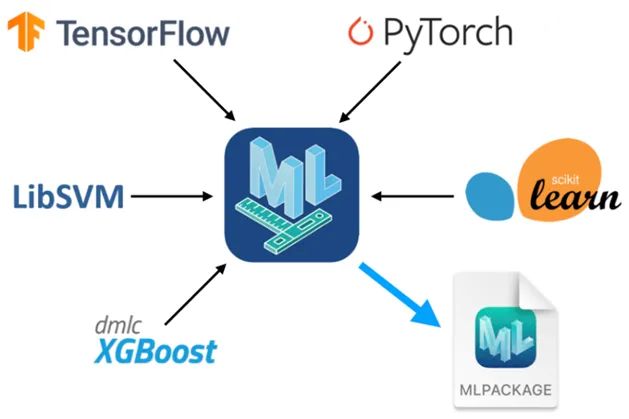
Beyond conversion, coremltools exposes utilities for inspecting the model spec, applying weight quantisation, and checking which compute units a given model is compatible with. It will also run the converted model from Python, which is the cheapest way to confirm parity with the source framework before any Xcode or iOS work begins.
This places Core ML in a broader cross-platform picture. iOS deployment goes through Core ML; Android and most desktop runtimes go through ONNX Runtime. The architectural question is whether a single distilled model can satisfy the latency budget across both, or whether per-platform quantisation is required. We cover that trade-off in detail in the parent piece on cross-platform TTS inference on ONNX and Core ML; the rest of this article assumes Core ML has been chosen and focuses on how coremltools gets you there.
The worked example: a diffusion model on faces
To make the conversion concrete, we trained a small U-Net diffusion model on the CelebAMask-HQ dataset — roughly thirty thousand high-resolution face images. The model code, training loop, and Core ML export script live in this repository. The dataset is wrapped in a custom Dataset class and fed through a standard DataLoader:
data = CelebDataset(data_path, transform=data_transform)
dataloader = DataLoader(data, batch_size=BATCH_SIZE, shuffle=True, drop_last=True)
Training is delegated to a Trainer module that handles the U-Net forward pass, the diffusion schedule, checkpointing, and logging. The outer loop in main.py is unremarkable:
trainer = Trainer(args.model_dir, args.T, args.START_B,
                  args.END_B, args.IMG_SIZE, args.BATCH_SIZE)
trainer.save_checkpoint()

if args.restart_training:
    trainer.clear_checkpoints()
else:
    trainer.load_checkpoint()

for epoch in tqdm(range(args.epochs)):
    for step, batch in enumerate(dataloader):
        loss = trainer.training_step(batch[0])
        print(f"epoch {epoch}, step {step}, loss: {loss}")
        if step == 0:
            trainer.save_checkpoint()
            trainer.log_history(loss)
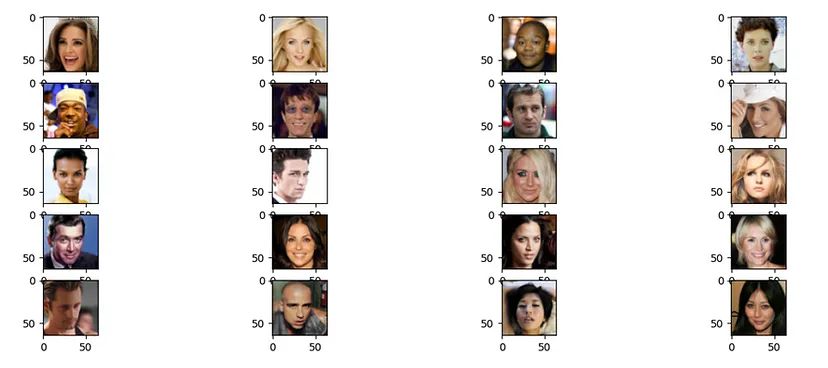
We trained for 40 epochs at batch size 4 and 64×64 resolution. The samples below are not portrait-grade; they are good enough to confirm the diffusion process has converged, which is all the conversion step needs.

From PyTorch to Core ML in two hops
The PyTorch model does not go directly to Core ML. It goes through TorchScript first, and then through coremltools.convert. The intermediate TorchScript step is what makes the model serialisable outside Python — which is what Core ML needs.
TorchScript itself offers two conversion paths, and the choice matters:
torch.jit.traceruns the model once on dummy inputs and records every operation that fires along that single execution path. It cannot capture data-dependent control flow.torch.jit.scriptparses the Python source of the model and compiles it into a graph that does retain control flow.
Our U-Net has no if branches that depend on tensor values, so jit.trace is sufficient and produces a leaner graph:
dummy_img = torch.rand((1, 3, args.IMG_SIZE, args.IMG_SIZE)).float()
dummy_timestep = torch.randint(0, 100, (2,)).long()
model_ts = torch.jit.trace(model, (dummy_img, dummy_timestep))
The conversion proper is a single coremltools call, with explicit input and output tensor descriptors:
model_ct = ct.convert(model_ts,
                      inputs=[ct.TensorType(name="img_input", shape=dummy_img.shape),
                              ct.TensorType(name="timestep_input", shape=dummy_timestep.shape)],
                      outputs=[ct.TensorType(name="noise_prediction")])

mlmodel_path = os.path.join(args.model_dir, "model.mlmodel")
model_ct.save(mlmodel_path)
Three things are worth pulling out of that call.
TensorType vs ImageType
coremltools defaults to TensorType, which maps to MLMultiArray on-device. That is the right choice for arbitrary numerical I/O, and it is what we used here because the diffusion model also takes a timestep vector. For models whose input is straightforwardly an RGB or grayscale image, ImageType is usually preferable: it integrates cleanly with Apple’s Vision framework, accepts native image buffers without manual conversion, and supports per-channel bias and scale baked into the model.
A typical normalisation pattern — input pixels in [0, 255], model expecting [-1, 1] — fits neatly into the ImageType declaration:
model_ct = ct.convert(model_ts,
                      inputs=[ct.ImageType(name="img_input", shape=dummy_img.shape,
                                           bias=[-1, -1, -1], scale=1/127.5),
                              ct.TensorType(name="timestep_input", shape=dummy_timestep.shape)],
                      outputs=[ct.TensorType(name="noise_prediction")])
The restriction is that ImageType only accepts standard RGB or grayscale layouts. Anything else — multi-channel feature maps, depth, alpha — falls back to MLMultiArray.
Compute units and ANE compatibility
Core ML schedules the model across whichever compute units the device exposes. By default the converter picks the optimal path, which on recent Apple Silicon means the ANE is preferred for compatible layers, with GPU and CPU as fallback. You can constrain this explicitly — usually for debugging or for forcing a fair like-for-like comparison:
model = ct.models.MLModel(model=model, preferred_devices=['cpu'])
Two utilities are useful when investigating why a model is running slower than expected on a given device:
devices = ct.utils.available_devices()
print(devices)

spec = ct.utils.load_spec('path/to/your/model.mlmodel')
print(ct.utils.get_device_capabilities(spec))
Not every op has an ANE implementation. A model that uses an unsupported op anywhere in its graph will silently fall back to GPU or CPU for that subgraph, with a corresponding latency cost. This is one of the more common ways a conversion looks successful on the surface but degrades real-world performance. The general guidance in the parent CCU on cross-platform inference choices applies here directly: measure on-device latency under realistic load, not just conversion success.
Parity with the source model
Before any Xcode integration, we run the converted Core ML model from Python against the same inputs the PyTorch model saw, and compare outputs. For our diffusion model that means swapping the PyTorch forward call for a Core ML predict call inside the sampling loop:
x_np = x.detach().cpu().numpy()
t_np = t.detach().cpu().numpy().astype(np.float32)
model_output = unet_ct.predict({"img_input": x_np, "timestep_input": t_np})
img_out = model_output["noise_prediction"]
The samples produced by the Core ML model are visually indistinguishable from the PyTorch outputs:
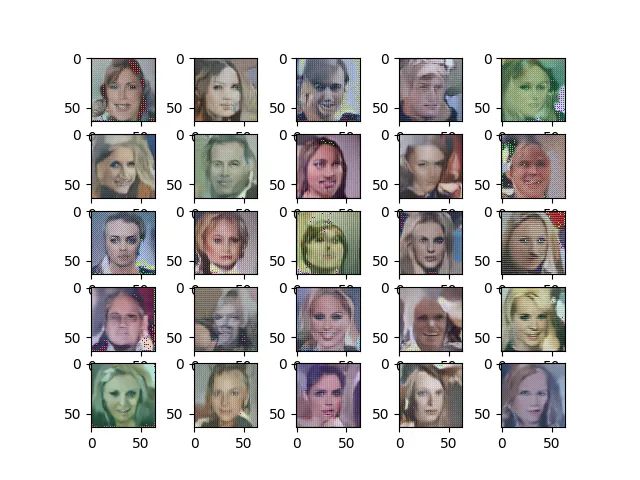
That parity check is the gate. If outputs diverge meaningfully, the issue is almost always upstream of Core ML — a normalisation mismatch, a missing input, or a TorchScript trace that captured the wrong code path.
What to keep in mind
| Concern | What to do |
|---|---|
| Choice of tracing vs scripting | Use jit.trace for static graphs; jit.script only when the model has data-dependent control flow |
| Image inputs | Prefer ImageType with scale and bias for cleaner integration with Vision and zero-copy buffers |
| ANE compatibility | Inspect the converted spec; unsupported ops force GPU/CPU fallback and inflate latency silently |
| Parity check | Run the Core ML model from Python on identical inputs before any Xcode work |
| Compute-unit pinning | Useful for debugging; do not ship with preferred_devices=['cpu'] unless that is the deliberate choice |
Where Core ML sits in a cross-platform strategy
Converting a model requires an intermediate representation: TorchScript or an ONNX graph.cing an .mlpackage artifact. A model that has to run on iOS, Android, and the desktop needs a deliberate choice between (a) shipping one distilled model that meets the latency budget on every target and (b) shipping per-platform quantised variants and accepting separate validation cycles per runtime. We documented that decision and its measurement framework in the parent piece on cross-platform TTS inference on ONNX and Core ML, and the case study on TTS inference optimisation on edge shows the on-device latency numbers that ultimately justified the distillation route for that engagement.
For anything that is going to run on Apple hardware, the takeaway is narrower. coremltools is the one mandatory step, the conversion is straightforward when the graph is well-behaved, and the failure modes — silent ANE fallback, normalisation mismatches, ImageType constraints — are predictable enough to test for before the model ever reaches a device.
FAQ
How do I deliver real-time TTS inference cross-platform on ONNX and CoreML?
Distil to a single smaller model that meets the latency budget on every target, then export once to ONNX for Android and desktop and once to Core ML via coremltools for iOS and macOS. Per-platform quantisation is the alternative but requires separate validation per runtime. The decision is covered in the parent article on cross-platform TTS.
Where does ONNX-to-CoreML conversion silently degrade audio quality or performance?
The two common failure modes are operator coverage and normalisation drift. If an op is not supported by the Apple Neural Engine, Core ML falls back to GPU or CPU for that subgraph, inflating latency without raising an error. Input scaling and bias declared on the source model must match what coremltools emits — otherwise outputs shift in ways that are subtle on images and audible on audio.
Which model-compression strategy keeps TTS quality acceptable across runtimes?
In our experience, distillation generally preserves quality more uniformly across runtimes than per-platform quantisation. Quantisation produces inconsistent quality at the boundary between platforms because the rounding behaviour differs between ONNX Runtime quantisers and Core ML’s own optimisation passes. This is an observed pattern across our cross-platform engagements, not a benchmarked rate.
How do I QA a TTS pipeline across multiple runtimes without re-validating per platform from scratch?
Anchor on a single reference model and run a parity check from Python — Core ML via coremltools.predict, ONNX via ONNX Runtime — against the same inputs before any platform-specific integration. Latency is measured on-device; output parity is measured off-device. That split keeps per-platform validation bounded to runtime behaviour rather than model correctness.
What does “production-ready” mean for cross-platform TTS — measurable in jitter, dropout, and MOS?
Production-ready means meeting an explicit p95 latency target under realistic load, holding jitter inside a budget that does not cause audible discontinuity, dropout below the streaming buffer’s tolerance, and a mean opinion score (MOS) within a declared delta of the reference model on every target platform. The thresholds are project-specific; the discipline is that they are stated up front, not discovered after release.